

Often, in an engineering firm when a client calls to enquire about the status of their report, the answer isn’t immediate. The person answering has to first work out who it was assigned to, then search through the relevant emails, and perhaps ask a colleague who might know more. In the meantime, the client is left waiting, and the impression they take away isn’t the best.
The problem is not simply one of disorganisation, but rather relates to the methodology for managing information.
There are a number of tools and techniques to improve the overview within an engineering team which, with little effort, can radically transform the management of tickets and reports, making this management process much more streamlined and with a clear role distribution.
CONTENTS
- A preliminary note: beware of tool fragmentation
- Common problems and how to solve them using the right method
- 1. Requests do not follow a standard format, so they cannot be compared or prioritised
- 2. The documentation and the people involved are not included in the ticket
- 3. It is unclear who is responsible now and who was responsible before
- 4. Assigned ToDo’s do not have a specific deadline
- 5. Productivity is disrupted by update requests
- 6. Every check is carried out manually
- The case of Euroricambi Group
- One stage of a wider process
- Would you like to see how this works in your department?
A preliminary note: beware of tool fragmentation
In most technical and engineering departments, there is no shortage of tools; in fact, there are often too many. A shared inbox for incoming requests, a team chat for quick clarifications, perhaps a specialised ticketing tool – though used only by part of the team and disconnected from the rest of the project management. Each of these tools does its job well, taken individually, but the problem arises from the lack of interaction between them.
The request arrives via email, the assignment is decided in a chat, and the resource’s workload can only be viewed by opening yet another tool – the planning tool.
The result is poor traceability, with responsibility for the ticket remaining implicit, and management continuing at risk whenever someone is absent. The same pattern recurs almost identically when it comes to allocating technical resources or measuring a project’s actual progress: the content changes, but the underlying problem – fragmented information spread across multiple systems that do not communicate with one another – remains the same.
Common problems and how to solve them using the right method
Each of the symptoms described above has a specific cause; let’s look at them one by one, along with the feature that resolves them.
1. Requests do not follow a standard format, so they cannot be compared or prioritised
Twproject, one of the best project management software programmes in the engineering sector, solves this with the ToDo, the tool’s smallest unit of work.
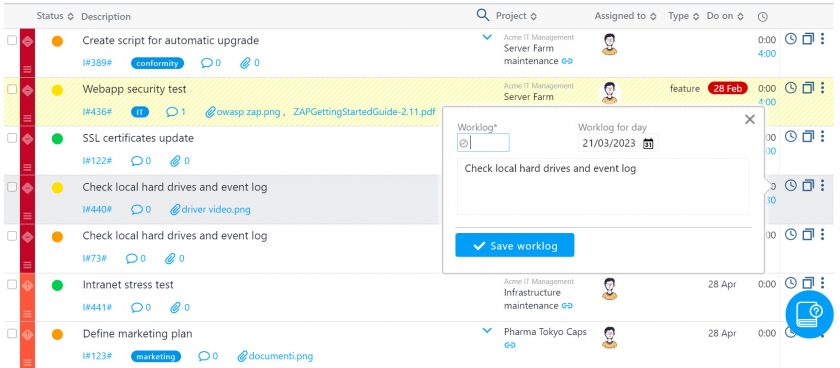
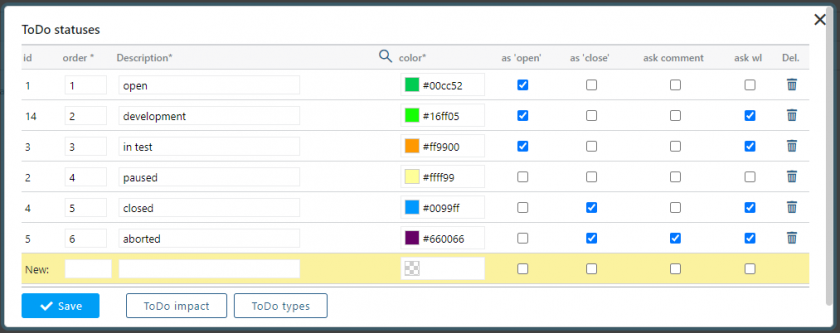
With the system designed, every ticket or report becomes a ToDo with a deadline, priority and status. The statuses are customisable, so each company can replicate its own actual workflow: open, in progress, awaiting client response, closed, or whatever terminology the department already uses, rather than having to adapt to a rigid workflow imposed by the tool.
2. The documentation and the people involved are not included in the ticket
Almost always, simply reporting the issue is not enough: every task to be carried out requires shared documentation. In Twproject , every ToDo can have files attached directly to it: a screenshot of the error, a technical specification or correspondence with the client remain attached to the request, indexed and retrievable even months later, without having to track down where that document ended up.

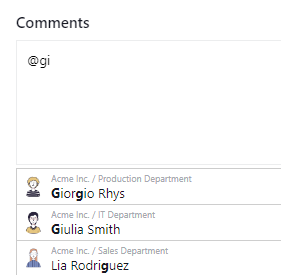
And if you need the input of a more experienced colleague or a manager, a mention in the comment, using the @ symbol, involves them straight away, without having to reassign the ToDo and without taking the conversation out of the tool.
3. It is unclear who is responsible now and who was responsible before
Every change of assignee, whilst sometimes unavoidable, can cause confusion, and it can happen that a ticket remains unresolved for months, simply because there has been a break in the chain of assignments, if these take place on different platforms and using non-standardised methods.
On the contrary, in Twproject every change of assignment is recorded in the history and can always be viewed.
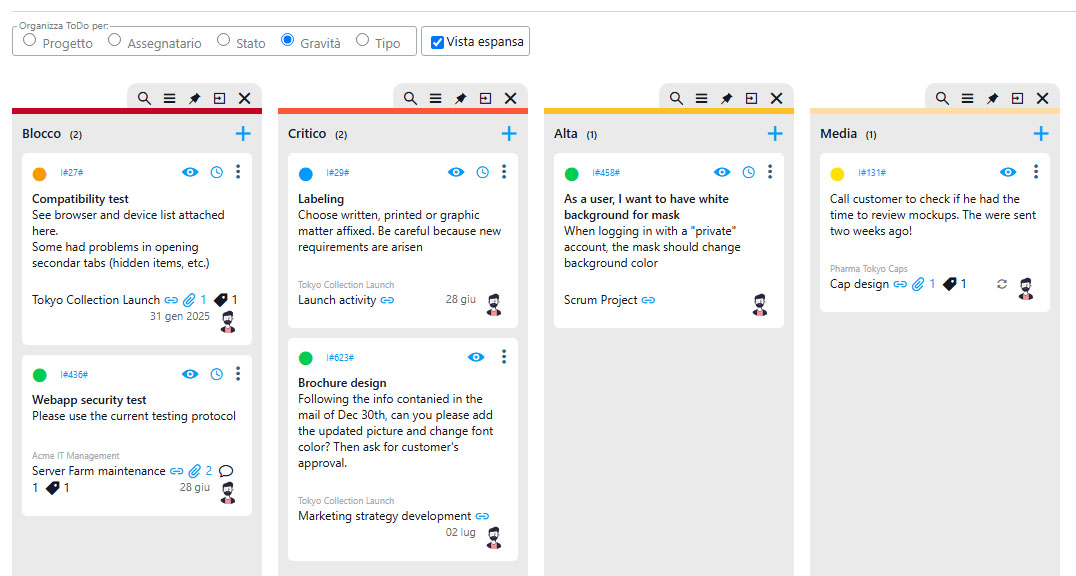
Furthermore, for those who monitor the status of project activities from a high-level perspective, the Kanban view with its filters by status, project, client and date, helps bring everything together on a single screen.
4. Assigned ToDo’s do not have a specific deadline
When tasks are assigned without a deadline or a specific completion date, this means that the up-to-date workload of resources is not taken into account, and this leads to delays in fulfilling requests.
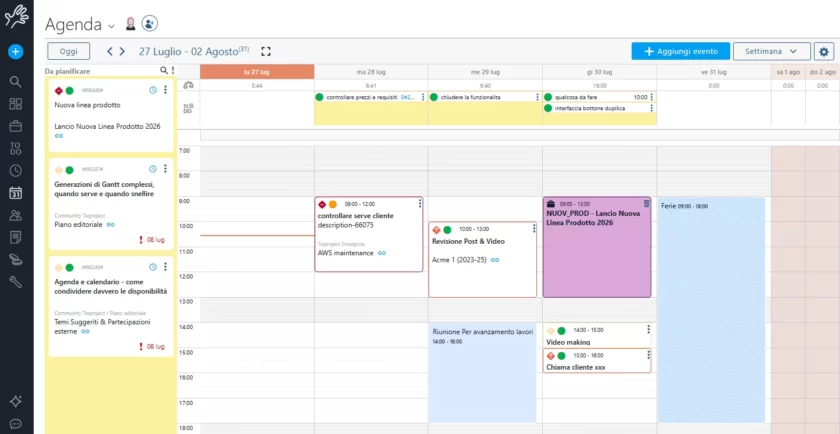
Twproject has developed the My Weekly Workspace feature for this purpose: with this feature, To-Dos without a date appear in a dedicated column of the Personal Agenda (a tool that is also integrated with external calendars) and can be dragged directly onto the day and time when they will actually be tackled, with a defined duration.
Similarly, To-Dos with a date can be moved or resized just as easily. Every task planned in this way is automatically reflected in the resource load, giving the team manager a realistic, rather than estimated, view of how busy each person really is.
5. Productivity is disrupted by update requests
Another classic scenario that undermines the productivity of engineering teams involves update requests. When informal systems are used, customers frequently call or write to enquire about the status of their report, taking up the team’s time.
The public project pages allow clients to monitor progress independently; the assignee can reply by email whilst remaining within Twproject, and the reply is recorded as a comment on the ToDo.

6. Every check is carried out manually
Finally, one last point, but one we consider crucial: if the person who assigned the request provides updates on its status manually and relies solely on their own memory, delays are inevitable.
A good management system, such as Twproject, uses automatic and customisable notifications to alert those involved (the requester, assignee and any other participants) when a ToDo is updated (status change), so nobody has to check at regular intervals but can rely on the software.

The Euroricambi Group case study
Euroricambi Group, an Italian leader in the aftermarket spare parts sector based in Bologna, has gone through precisely this phase. Before adopting Twproject, the IT department managed requests via email, phone calls and personal notes; there was no shared overview of who was working on what.
With Twproject, we have finally gained a clear overview of ongoing activities, with the certainty of always knowing who is responsible for each task.

With Twproject, the team has centralised the management of IT tickets in a single shared tool, gaining a clear overview of who was responsible for each task.
A concrete example is the management of annual licence expiry dates: entered as ToDo’s in the respective projects, they ensured operational continuity even whilst staff were absent – an aspect that, in the engineering department, is just as important as sticking to the [link] schedule itself.
One stage of a wider process
Ticket management is one of the business processes under the most scrutiny, as it is the one through which the customer makes contact. But the same principle we’ve applied here (namely, favouring a single source of monitoring rather than multiple disconnected tools) also applies upstream, when deciding whether a project is feasible and what risks it entails, and downstream, when progress needs to be shared with the rest of the team or with management, producing valuable reports.
These are different processes, but they all stem from the same need: to always know who is doing what, and what information is available to them.
Would you like to see how this works in your department?
There’s no need to imagine how it might work. Twproject provides a dedicated tutor, an expert in processes for technical and engineering departments, who works alongside your team to set up ToDo’s, custom statuses, public pages and notifications, showing you exactly how to replicate the results achieved by other companies in your specific context.
👉 Request your dedicated tutor