

In consulting firms, managing multiple projects is the norm, not the exception. That’s why, in a recent article, we discussed how to handle multiple projects using a tool like a Portfolio.
In this case, instead, we want to focus on issues related to resource management, in order to provide consulting teams with some practical examples of the processes they can implement to improve this area.
In a consulting firm, the same team—often the same people—works on multiple projects simultaneously, with shifting priorities, overlapping deadlines, and clients requesting updates all at once. In this context, the risk isn’t doing things wrong; it’s failing to identify bottlenecks in time.
Here, we will attempt to address the most common challenges in allocating and balancing resources across projects through a series of questions.
CONTENT
- Why is managing resources across multiple projects so difficult?
- How do you allocate resources on a phase-by-phase basis without creating bottlenecks?
- How do you monitor actual workload in real time?
- How do you manage priorities when everything seems urgent?
- A real-life case: Gap
- Do you want a clear overview of who is doing what?
Why is managing resources across multiple projects so difficult?
The problem isn’t just assigning the right person to the project. What’s really difficult is knowing, at all times, whether that person actually has the ability to do what they’ve been assigned. When information about workload isn’t visible in real time, the symptoms are always the same: sudden delays, teams under pressure, and PMs who only discover problems when it’s too late to take action.
From the perspective of resource allocation, the most common risks in agencies that manage multiple projects simultaneously are:
- the overlap of activities
- unsustainable workload peaks
- conflicts between the priorities of different projects
- the lack of visibility on the actual status of resources.
It’s not a matter of disorganization: it’s a matter of complexity growing faster than the tools used to manage it.
How do you allocate resources on a phase-by-phase basis without creating bottlenecks?
The solution lies in using software such as Twproject, which is specifically designed to meet the needs of consulting companies.
The starting point in Twproject is to break down each project into phases and sub-phases on the interactive Gantt chart, and assign resources at the phase level—not just at the project level. This significantly changes the way you work.
From the PM’s perspective, this means being able to delegate effectively: assigning an entire phase to a team member who takes full responsibility for it, with a clear understanding of their scope of work and the ability to manage it independently.
From the resource’s perspective, this means being able to focus on a specific task without having to keep track of the entire project. Once the phase is complete, the resource can leave the project—their workload is cleared, and they become available for other assignments.
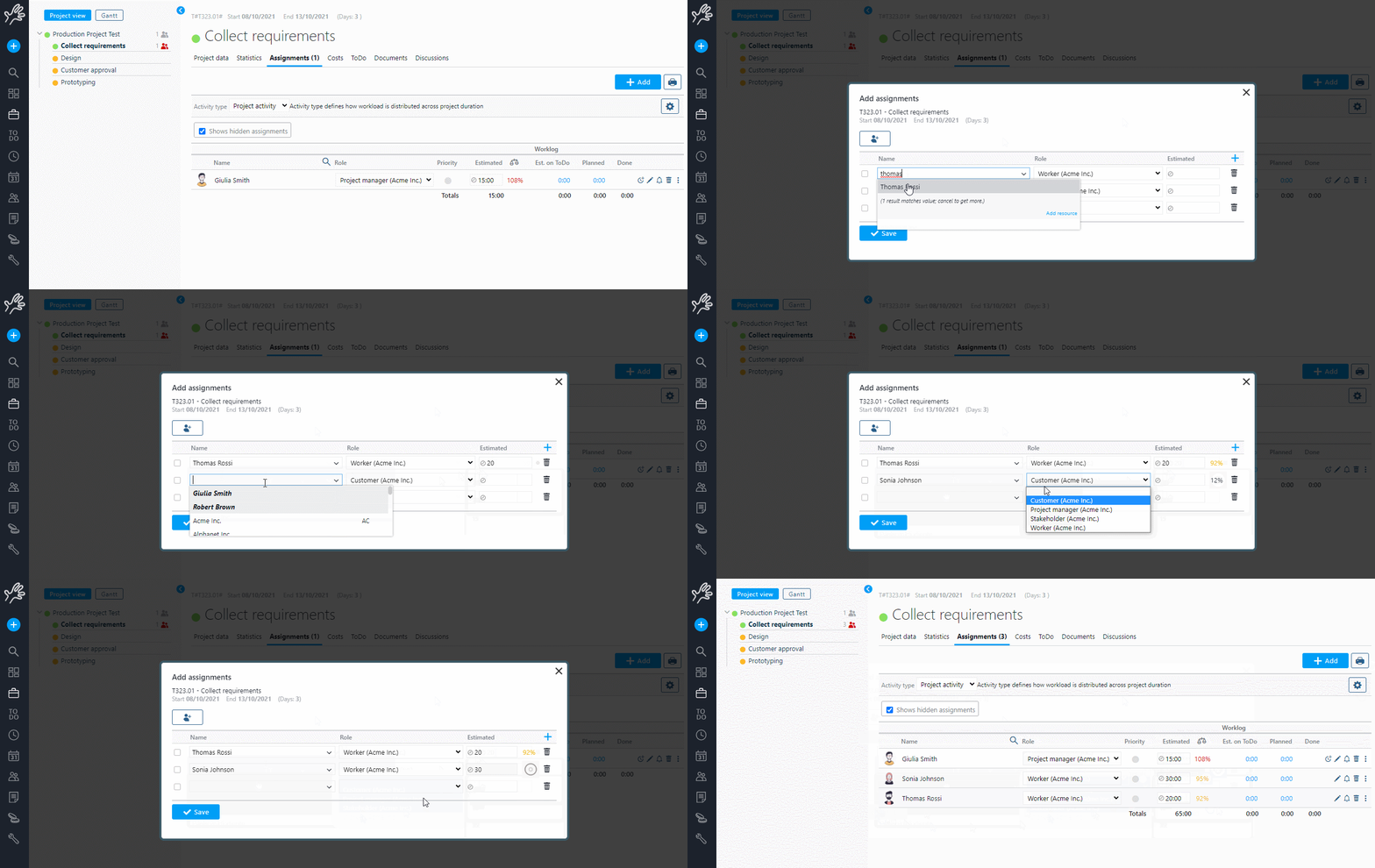
When creating or editing an assignment, Twproject displays in real time how much of that resource’s time is already allocated to other projects: a visual indicator of current workload allows the project manager to choose the right person before assigning them, rather than after a conflict has arisen.
How do you monitor actual workload in real time?
The workload view in Twproject displays a graphical representation of the daily workload for each team member: each color corresponds to a different project or phase, and you can click on any column to see the details of what it consists of.

The view is available on a weekly, biweekly, three-week, or monthly basis, and updates automatically as resources log their hours worked. Twproject’s algorithm doesn’t simply add up estimates: it distributes the workload by taking into account actual hours worked, each resource’s daily capacity, vacation and time off, and the remaining work.
If a team member has not reported the hours scheduled for a given day, the system automatically redistributes the workload across the following days—giving the project manager a constantly updated view of the actual situation, rather than the one planned months ago.
For agencies that manage distributed teams or complex departments, you can filter the view by department and analyze the aggregate workload without having to open every single project.
How do you manage priorities when everything seems urgent?
In a multi-project environment, priority is one of the most challenging variables to manage. Twproject allows you to set priorities directly on assignments: resources can clearly see what to focus on, and the project manager can adjust the sequence of tasks without having to call alignment meetings.
From the project portfolio, you can also adjust dates and resource allocations based on the strategic importance of each project, and use the automatic optimization feature to recalculate timelines based on actual resource capacity. The result is a plan that reflects reality—not an idealized blueprint that becomes obsolete at the first sign of change.

All of this is closely linked to project cost control and schedule planning: an overburdened resource is not just an operational problem, it is a financial warning sign. On Twproject, these aspects interact seamlessly on the same platform.
A real-life case: Gap
Gap Studies and Consulting, which specialises in outsourced management control, manages a team working across several complex projects. The company needed a tool that would allow it to allocate resources accurately and monitor progress transparently, and found the solution in Twproject.
Twproject includes an interactive Gantt chart that allows us to assign resources on a phase-by-phase basis. Thanks to this approach, we can monitor the progress of the project in all its aspects with complete transparency.

Resources report their hours directly against activities from any device, keeping both the workload and the final tally for each project updated in real time.
Do you want a clear overview of who is doing what?
Spreading the workload across multiple projects without creating bottlenecks requires a tool that’s set up correctly from the start. See how easy it is to do this with Twproject.
If you need to see how the software works in your specific situation, our experienced consulting tutors will show you Twproject set up to match your actual workflow: teams, phases, priorities and workload already organised according to the structure of your projects.
👉 Take advantage of this offer and book your free, personalised demo


