

Managing one project at a time is one thing. Managing ten projects simultaneously — for different clients, with shared teams and overlapping deadlines—is quite another. The real challenge for consulting firms isn’t the individual project; it’s having a big-picture view that allows them to make quick decisions without getting lost in the details.
When this big-picture perspective is missing, problems always surface too late: an overburdened resource, a project in the red, a critical deadline that’s been overlooked. Not because no one was working on it, but because no one had the full picture.
CONTENT
- How can I get a complete overview of all active projects (without losing track of them)?
- How to identify where you’re wasting time, budget, or resources on projects
- How to quickly spot projects that are behind schedule or over budget
- How to decide which projects are truly a priority
- How to create reports for clients without wasting hours every week
- Take advice from those who already know it: the case of Temera
- Would you like to keep track of your portfolio all in one place?
What is needed, therefore, is a comprehensive strategic management approach that focuses on evaluating projects as a whole and the organization’s ability to execute them. Let’s take a closer look at how to carry out this management activity using the Project Portfolio, a tool designed to link day-to-day work with strategic business objectives, helping you define an action plan.
How can I get a complete overview of all active projects (without losing track of them)?
If you use software like Twproject, you can access a portfolio view that consolidates all active projects into a single dashboard, with advanced filters by status, client, time period, budget, and resources involved.
This isn’t just a simple list; it’s a tool that helps you quickly identify where to take action and what to focus on.

In the Portfolio dashboard, you can assess the progress of projects based on various metrics. For example, if you want to analyze the financial situation in terms of the ratio of actual costs to estimated costs, you’ll find a chart with automatic calculations for all ongoing projects; if you want to see how assigned tasks are progressing, you can check the status of ToDos, and so on.
This way, you can immediately identify issues and opportunities without having to analyze each order individually.
How to identify where you’re wasting time, budget, or resources on projects
One of the most common problems is not being able to clearly view projects from multiple perspectives at the same time.
The Portfolio in Twproject is not a static list of projects: it is a large, comprehensive Gantt chart that can be analyzed simultaneously on three levels:
- From a timeline perspective, you can view the progress of each project in relation to planned deadlines.
- From a financial perspective, by clicking the command Financial Data, a complete financial overview appears next to each project: budget, estimated costs, and actual costs at a glance, allowing you to immediately identify where cost overruns are occurring.
- From a resource perspective, a dedicated view shows who is working on what and their workload.
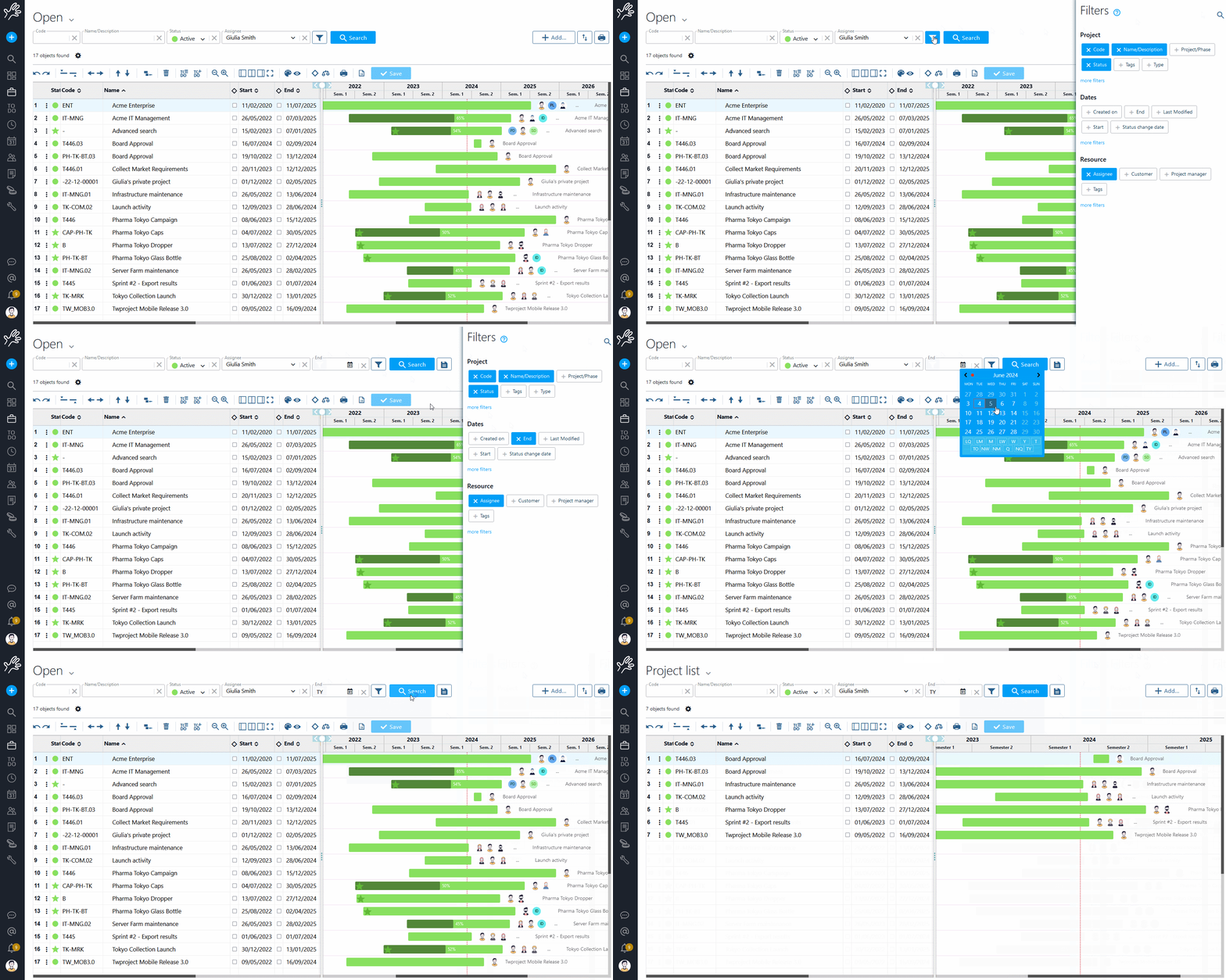
All of this is made possible by a very powerful system of combineable filters: for example, you can select all open projects assigned to your department in the current month. This filter can be saved as a custom default setting, so you don’t have to reconfigure it every time.
Second, if you like, you can filter the list to show only those projects that have generated less revenue than expected and therefore need to be reevaluated.
How to quickly spot projects that are behind schedule or over budget

Many problems tend to surface when it’s already too late to take action: budgets have been exceeded, people are overwhelmed, and delays have piled up.
In addition to manual monitoring, Twproject automatically flags projects that are spiraling out of control. For example, you can set Budget overflow as the default filter, which highlights all projects with financial difficulties with a single click.
Similarly, if you select the workload view — accessible via the scale icon on the portfolio’s main screen — you can highlight resources that are overloaded across multiple projects at the same time.
Once you’ve identified the issue, Twproject lets you take action directly from the same screen: for example, if resources are overloaded, you can use the Optimize end date based on resource capacity command to automatically redistribute the workload among the affected resources. The system calculates the optimal extension of deadlines to bring each person back to a sustainable workload level—without having to open individual projects one by one.

How to decide which projects are truly a priority
When everything seems urgent, there is a risk of treating every project the same way — with consequences for quality and profit margins.
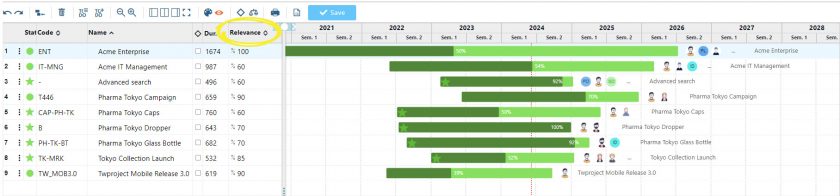
Assessments of the overall progress of projects allow you to calculate their strategic importance. With the Twproject Portfolio, you can assign this value (the ‘relevance’) among the available fields and use it as a sorting criterion: the most important projects move to the top of the list, and from there you can redefine timelines and resource allocations in order of priority, ensuring that the best resources are focused on the projects that matter most.
Furthermore, if you manage recurring or structurally similar projects — audits, implementations, assessments, training courses—Twproject allows you to clone existing structures or use predefined project templates, drastically reducing the setup time for each new project.
How to create reports for clients without wasting hours every week
Keeping clients up to date on the status of projects is one of the most time-consuming tasks for a consulting firm: email updates, PowerPoint presentations prepared on the fly, and status calls that could be avoided. Twproject tackles this problem in a structured way.
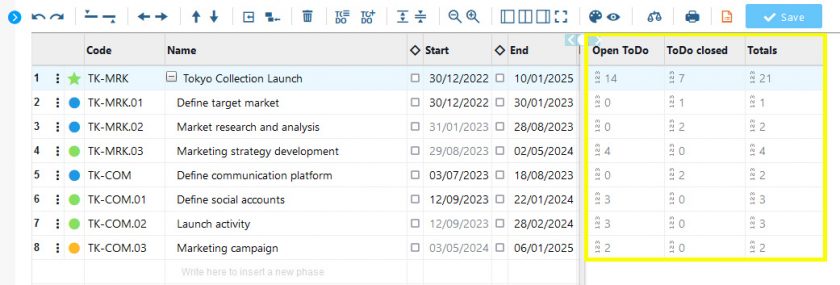
Within the Portfolio, you can assign a ToDo status to each project: an at-a-glance overview of what’s in progress, what’s on hold, and what’s already completed. This may seem like a minor detail, but it’s invaluable when you need to communicate progress quickly and accurately—both within the team and externally.
Creating a collaborative environment to facilitate faster information exchange is, after all, one of the goals of Portfolio management, with the ultimate aim of streamlining activity planning and overall monitoring.
Take advice from those who already know it: the case of Temera
Temera is an agency that manages dozens of projects simultaneously for various clients. Before Twproject, keeping track of the entire portfolio required a significant amount of administrative work. Thanks to the centralized dashboard, customized for each project manager, the team was able to monitor every project in its entirety—timelines, costs, resources—without having to cross-reference data across different tools.
We were able to manage all our custom projects in a single environment, maintaining full control over which resources are used, project timelines, and the performance of individual project managers throughout the project lifecycle. This provided us with a simple yet powerful way to manage a growing number of projects with increasing levels of complexity.

The adoption of Twproject by companies such as Temera underscores the need for an integrated approach to managing the project portfolio: a unified platform brings together cost control, planning, and resource management into a single, comprehensive view. When a project’s status changes, the portfolio dashboard updates in real time.
📹 Watch a summary of everything you can do:
Would you like to keep track of your portfolio all in one place?
For a consulting firm, learning to use the Project Portfolio strategically can significantly help save on administrative and internal project management resources, as was the case with Temera.
If you want to understand how a portfolio can be integrated into your agency, we have an expert consultant who can show you how to set it up in Twproject based on your agency’s actual structure: clients, projects, teams, and deadlines.
👉 Book your free, personalized demo


Excellent guide for PM experts! This article perfectly bridges the gap between daily tasks and strategic business objectives. A must-read for any consulting firm looking to scale efficiently.