

Imagine a business project involving the engineering department, production, administration and an overseas branch. The engineering department works standard shifts, production works three shifts, administration works reduced hours on Fridays, and the branch observes different public holidays. How do you calculate actual lead times? How do you know if a resource is actually available when you need it?
If you manage human resources at a production company – whether you’re the production manager, a project manager or someone responsible for organising the workforce – this isn’t a theoretical question. It’s a question you ask yourself every week, and one you often answerroughly.
And at a rough guess, delays quietly pile up until it’s no longer possible to catch up…
CONTENT
- 1. Different calendars lead to systematically inaccurate estimates
- Solution: multiple calendars configurable at every level
- 2. You know who is available, but not for how long
- Solution: an aggregated workload view by resource and by department
- 3. Difficulties in recording and managing working hours
- Solution: multiple entry methods, tailored to the user
- A real-life example: the Cepi Silos case study
- Does your planning system really know your team’s working hours and availability?
It’s not easy to manage a diverse or international project team and find precise, practical ways of scheduling resources across projects without losing your mind.
Let’s look at the main challenges a project manager in a production company faces when coordinating resources, and the practical solutions for tackling them.
1. Different calendars lead to systematically inaccurate estimates
When planning a project without taking into account the actual working hours of the resources involved, estimates are off the mark from day one. A phase that ‘should take two weeks’ ends up taking three because there is a local public holiday in between that nobody had taken into account, or because the department involved is working reduced hours during the summer.
This sort of error isn’t anyone’s fault, but stems from a lack of the right tools. An Excel spreadsheet doesn’t know that a particular department doesn’t work on a local public holiday. A static Gantt chart doesn’t automatically adjust estimates when a resource is moved to another project. The result is plans that appear accurate but aren’t, and errors are always discovered too late.
Solution: multiple calendars configurable at every level
It is essential to have tools that allow you to set up multiple calendars (for each resource, department or project) that reflect actual working hours: shifts, local public holidays, company closure periods and reduced working hours.
With Twproject, one of the best software solutions for resource and project management within production companies, when you plan a task, the system automatically calculates the timelines based on the specific calendar of the assigned resource, rather than a generic standard timetable.
Multiple calendars in Twproject are configured at various levels: there is a default calendar for the whole company, which can be overridden at project, department or individual resource level.
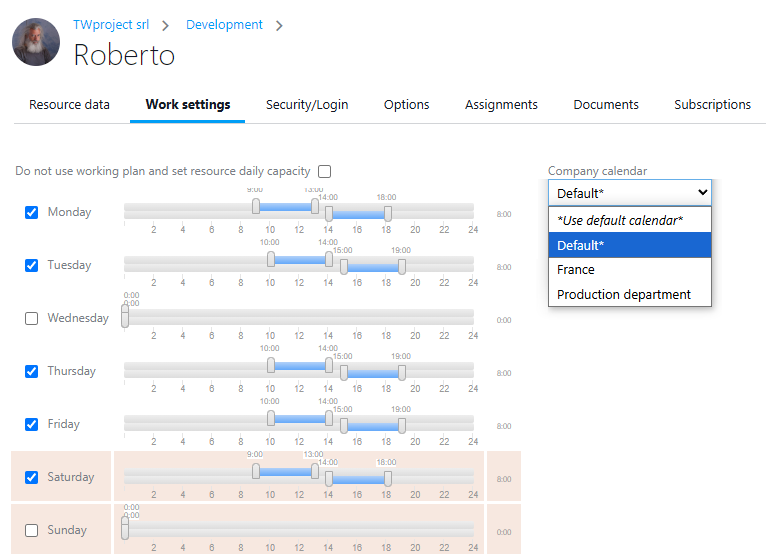
A company with offices in several countries can therefore manage these differences without creating parallel systems: everything is in a single system, with exceptions handled in a structured manner. The end date calculated by Twproject is a real date, not a theoretical one, and if one phase depends on another managed by a department with different working hours, the dependency is calculated correctly.
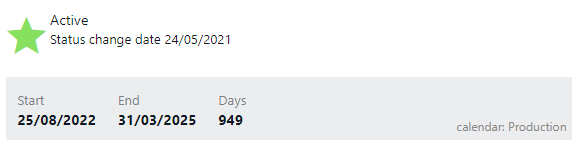
The system automatically calculates personnel costs based on the configured hourly rates, and allocates them to the direct costs recorded for each individual stage.
2. You know who’s available, but not for how long
Knowing the working hours is only half the story. The other half is knowing, at all times, what the actual workload is for each team member, not on paper, but in reality. Someone may be ‘available’ according to the calendar, yet at the same time be overloaded because they have been assigned to three different projects without anyone having the big picture to realise it.
Without a tool that consolidates the workload across projects and departments, those organising the work find themselves walking a tightrope: they know what is happening in their own project, but not in the parallel projects that are taking up the same staff.
Solution: an aggregated workload view by resource and by department
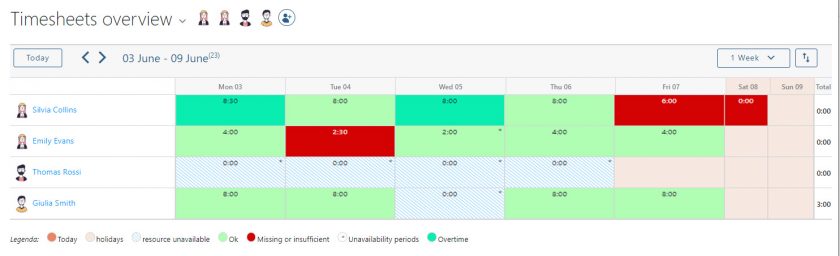
Twproject calculates each resource’s workload by automatically aggregating the estimated hours across all the projects and phases to which they are assigned, and comparing these with the actual capacity defined by their calendar. Those organising the work can see at a glance who is overloaded, who has spare capacity, and on which projects the critical workload is concentrated, with the option to filter the view by department, project or individual.


If an imbalance arises, Twproject allows you to take action directly from the same view: redistribute hours amongst resources, move the start date of a phase, or use the automatic optimisation feature, which recalculates timelines based on actual available capacity. This transforms staff management from reactive to proactive: you can spot overloading before it leads to delays.
3. Difficulties in recording and managing working hours
Even the most accurate timetable and the best-distributed workload are of little use if the hours actually worked are not recorded, or are recorded incorrectly or late. In production companies, people working on the shop floor often do not have the same digital habits as those working in an office: asking them to fill in a timesheet that is too complex is a sure-fire way to end up with missing or inaccurate data.
Solution: multiple entry methods, tailored to the user
Twproject offers various ways of tracking working hours, designed to suit different user profiles:
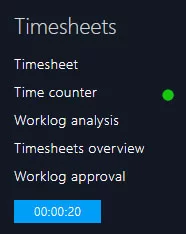
- traditional manual entry for projects and phases;
- a stopwatch for those who prefer to start and stop tracking in real time;
- the option to record hours directly from assigned ToDo’s, which is useful for those who work on operational micro-tasks rather than structured project phases.
The system can also generate automatic timesheets based on planned assignments, reducing the workload for those who simply need to confirm or correct what has already been scheduled.

To ensure that no hours are lost, Twproject sends automatic notifications to assignees who have not completed their registration, keeping the data up to date without the resource manager having to chase up every single person to find out whether they have filled in their worklog.
| Problem | Solution in Twproject | Benefit for resource managers |
|---|---|---|
| Different work schedules across departments, sites and resources lead to consistently inaccurate time estimates | Multiple configurable calendars per resource, department or project, with shifts, local public holidays and reduced working hours automatically factored into timelines | Realistic delivery estimates and no errors in planning |
| Lack of transparency regarding the actual workload each resource is carrying across all projects simultaneously | Aggregated workload view by resource and by department, with the option to reallocate hours and automatically optimise timelines | Overloads identified before they turn into delays; proactive team management |
| Delays and inaccuracies in the recording of hours worked | Multiple entry methods (manual, stopwatch, ToDo, automatic timesheets) with notifications to assignees for missing entries | Complete and reliable real-time finalised data |
A real-life example: the Cepi Silos case
Cepi Silos, an Italian company specialising in the design and installation of industrial plant for the food industry, was faced with a classic problem encountered by well-established production companies: each department had its own systems for managing staff working hours, as well as a limited view of the projects.
Information was lost between departments, reports were left unresolved for months, and no one had an overall view of the available resources. In the words of Gian Marco Milanesi, Head of the Technical Department:
‘I found myself faced with the challenge of having to update several Excel spreadsheets and manage hundreds of emails: a task that was extremely time-consuming and provided only a limited overview of the resources available to complete projects within the desired timeframe.’
With Twproject, Cepi Silos has centralised the management of all its resources on a single platform, with shared visibility across departments. Schedules have been integrated and harmonised, whilst retaining their specific characteristics; the workload is now visible by department, with the ability to quickly reallocate resources in response to unforeseen events; hours worked on projects are accurately tracked, which is a key factor in optimising processes. The final assessment is summed up in one sentence that says it all:
Twproject allows us to manage resources efficiently and easily, avoiding the errors and effort required by the previous system

Does your planning system really know your team’s working hours and availability?
If the answer is ‘no’, or ‘more or less’, it means you are planning on an imprecise basis, and the resulting delays cannot be avoided simply by putting in more effort: they are structural.
Twproject adapts to the specific circumstances of your business, even those with a more complex structure: department-specific calendars, staff timetables, and public holidays by location. Our expert production tutors will show you how to set all this up so that the system plans for you, with estimates that reflect actual workflow rather than an idealised one.
👉 Set up Twproject to reflect your company’s actual structure: contact us today