

Organizing your team’s work with a shared calendar involves much more than just planning meetings and sticking to commitments.
Every day, there are tasks to complete, deadlines to meet, people to coordinate, and unexpected events to deal with.
When this information is scattered across emails, personal calendars, and different tools, it can be challenging to get a clear picture of your company’s commitments.
A shared calendar helps overcome this fragmentation by providing all team members with a common reference point for organizing work, checking availability, and planning activities.
However, if your company manages multiple projects simultaneously, simply sharing appointments isn’t enough. You need a tool that can sync your calendar with operational planning, preventing schedule conflicts and improving coordination among team members.
Let’s take a look at how to use a shared company calendar and why an integrated solution like Twproject can be a game-changer.
CONTENT
- What is a shared calendar and what is it for?
- How to successfully schedule your team’s calendar
- Shared calendar and Google Calendar: what are the differences?
- How Twproject’s shared calendar works
- 1. A single calendar for company appointments
- 2. Synchronization with Google Calendar and Outlook
- 3. Connect events to projects
- 4. Plan your workweek with My Weekly Workspace
- 5. Integration with workloads and timesheets
- Shared Calendar: from appointment management to project coordination
- Manage your team’s work with Twproject’s shared calendar
What is a shared calendar and what is it for?
A shared calendar is a digital tool that allows people to access and manage appointments, meetings, deadlines, and events in a single environment.
Unlike a personal calendar, it helps you coordinate multiple employees’ schedules and streamline communication between departments, managers, and project teams.
Imagine a company where the sales department schedules meetings with clients, the technical team organizes operational tasks, and project managers must plan activities for various projects.
If everyone uses a separate calendar, overlaps, misunderstandings, and delays can occur. A meeting might be scheduled while a team member is already busy with an important task, or a deadline might be changed without everyone involved being notified.
With a shared calendar, schedules are easier to view, and the team can organize itself based on up-to-date information.
The goal is not only to know when a meeting will take place, but to understand how daily commitments affect overall work planning.
A shared company calendar improves visibility into the team’s commitments, reduces the risk of overlaps, and streamlines communication across departments. It also makes it more convenient to schedule meetings and tasks with a better understanding of team members’ availability, even when they’re working from home or in a hybrid work setting.
How to successfully schedule your team’s calendar
Implementing a shared calendar within a company is fairly simple. Making effective use of it, however, requires some organizational guidelines.
– Link appointments to operational tasks: This is one of the key points for project-based teams.
A meeting with a client, a technical review, or a coordination meeting are not one-off events: they often require preparation, involve specific resources, and can affect deadlines.
Linking these appointments to projects allows for a better understanding of their impact on scheduling.
– Avoid the proliferation of separate calendars: many companies use personal calendars, department calendars, and project-specific tools all at the same time.
The problem arises when this information isn’t synchronized.
Before creating additional calendars, it’s a good idea to assess whether existing ones can be integrated into a common system.
The goal shouldn’t necessarily be to get rid of the other calendars, but to allow people to view and manage them without constantly duplicating information.
To learn more about this topic, you can also read the article Too many calendars? Switch to a single synchronized calendar.
Shared calendar and Google Calendar: what are the differences?
Among the most widely used tools for scheduling business appointments is Google Calendar, Google’s calendar service that lets you plan events, invite participants, and share your schedule with others.
It’s a great way to organize meetings and appointments, especially in companies that use Google Workspace.
With Google Calendar, you can create calendars for different work groups, manage access permissions, schedule recurring events, and check participants’ availability.
The “Share Calendar” feature also allows you to choose who can access appointments and what permissions to grant.
Nevertheless, when the goal becomes coordinating complex projects, the requirements change.
A traditional calendar shows when individuals are busy, but not necessarily how much work has been assigned to them, what tasks they need to complete, or how a new commitment will affect their schedule.
For example, an employee might not be scheduled for any meetings in the afternoon but could already be working on a technical task that requires several hours.
Their calendar looks empty, while their workload is already demanding.
With Twproject, thanks to the My Weekly Workspace feature, even operational tasks can be fitted into the weekly schedule. Team members can schedule their own ToDo, reserve time slots for project work, and indicate when they are busy.
This gives the project manager a more complete view of their team’s commitments, taking into account not only scheduled meetings but also the time allocated to project tasks.
This is exactly where the difference lies between sharing a calendar and using a calendar integrated into project management software.
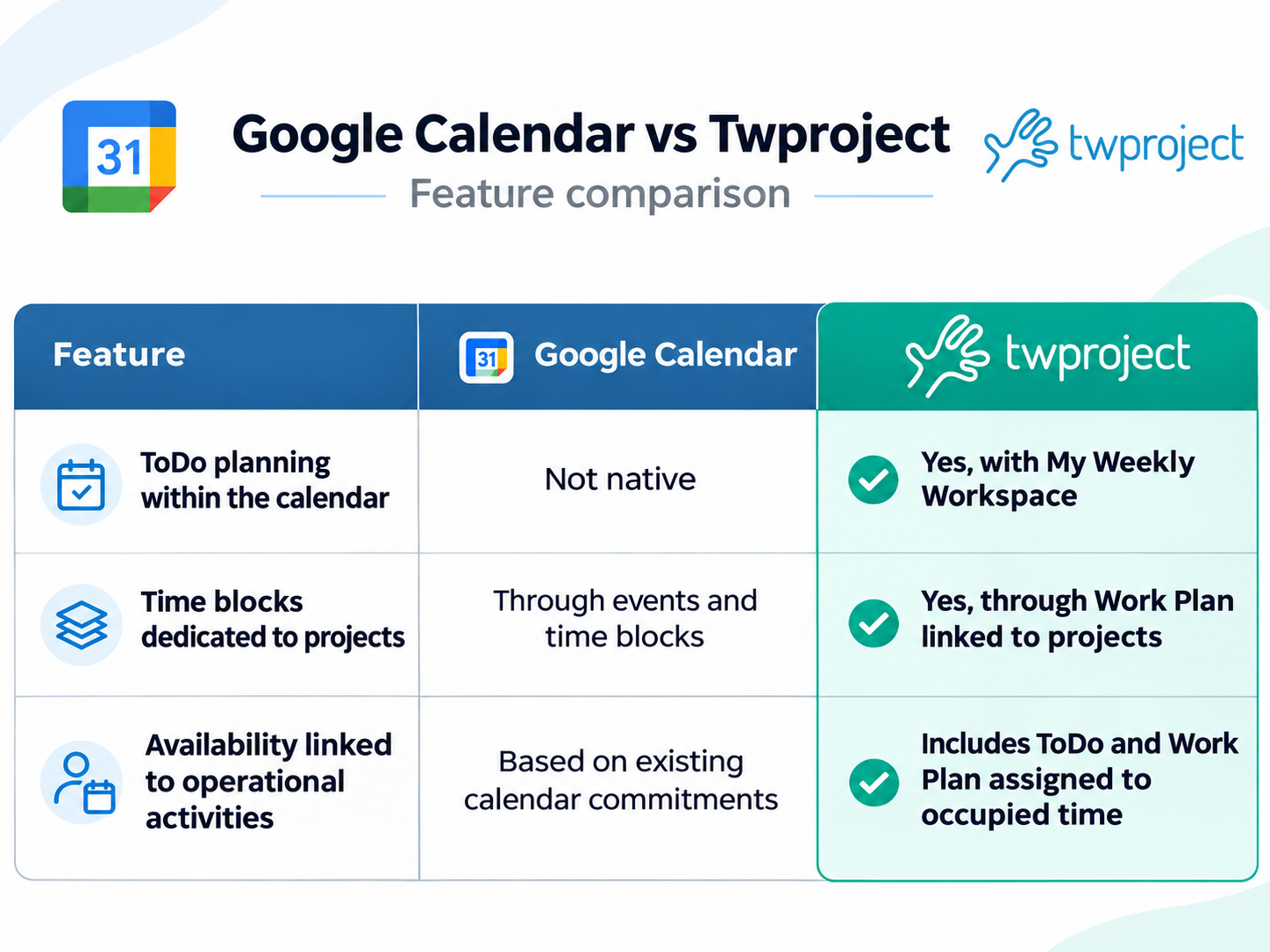
The benefit of Twproject, therefore, is not to replace all of Google Calendar’s features, but to provide an environment where appointments can be managed alongside project-related information.
Furthermore, thanks to two-way synchronization, the two tools can be used simultaneously.
How Twproject’s shared calendar works
The Twproject calendar is designed to seamlessly integrate appointment scheduling with the day-to-day management of business activities.
It helps you schedule events, arrange meetings, invite team members, and keep track of plans with weekly and monthly overviews.
Its main highlight is the option to sync appointments with project tasks and resource information, making planning more aligned with the actual work being done.
Let’s take a look at some of its most interesting features.
1. A single calendar for company appointments
With Twproject, you can check your schedule in a shared environment without having to switch back and forth between different tools.
Project managers can schedule meetings, plan sessions, and keep track of tasks and deadlines.
This makes it easier to coordinate among team members who are involved in multiple projects and need to manage both operational and organizational tasks concurrently.
2. Synchronization with Google Calendar and Outlook
One of the key benefits of the Twproject calendar is the option to integrate it with tools already used daily within your company.
Two-way synchronization with Google Calendar and Outlook allows you to check third-party calendars directly within your Twproject calendar and automatically transfer events scheduled in Twproject to the external calendar set as default.
You can also link multiple external calendars, even those from different services.
This way, employees can continue using their usual calendars, while the company maintains a more comprehensive view of everyone’s commitments.
There’s no need to give up existing tools to improve coordination.
3. Connect events to projects
In a large company, each meeting may involve different activities, responsibilities, and goals.
TWP helps you link events to one or more projects, providing a more tailored approach to scheduling.
For example, think of a technical meeting involving three team members working on a project.
With conventional calendars, the meeting is recorded as an appointment. With Twproject, however, it can be linked to the project and contribute to managing information related to the work undertaken.
This way, the calendar remains integrated with operational planning.
4. Plan your workweek with My Weekly Workspace
With the My Weekly Workspace feature, Twproject’s shared calendar also serves as a workspace where you can schedule weekly tasks, assign responsibilities, and plan the time to be dedicated to projects.
With the weekly overview, each team member can access their assigned to-dos and drag them directly to the day and time slot when they plan to complete them. You can adjust task duration, move tasks when priorities change, and create new to-dos without leaving the calendar.
Another especially convenient feature is the creation of Work Plans—specific time blocks set aside for working on a project, even when they aren’t linked to a specific task.
For example, a team member can reserve three hours on Tuesday morning to review a technical document and mark that time slot as occupied. Other team members will then be able to see that the time is unavailable and avoid scheduling meetings during that same time slot.
This approach makes it possible to shift from simply managing appointments to a more realistic planning of the workday, where meetings, tasks, and project commitments are considered as a whole.
5. Integration with workloads and timesheets
This is one of the features that make Twproject particularly appealing to project managers.
Calendar events can be linked to workload management and the tracking of hours worked.
With My Weekly Workspace, even the To-Dos and work plans scheduled in the calendar contribute to the visualization of resource workload. The project manager can therefore more accurately assess team members’ weekly commitments and spot any potential overloads before assigning new tasks.
Planning therefore becomes more dynamic: when priorities shift, tasks can be rescheduled directly in the calendar, keeping the information used to assess the team’s availability up to date.
For example, a project meeting can impact the participants’ operational availability and affect the time tracking for those activities.
Managers can thus evaluate scheduled commitments alongside other assignments, gaining a more realistic picture of the team’s availability.
Synchronization with worklogs also helps reduce redundant reports and improves the traceability of time spent on projects.
Shared Calendar: from appointment management to project coordination
A shared calendar becomes especially useful when a company runs multiple projects concurrently and the same team members are involved in different efforts.
In these scenarios, knowing the scheduled appointments isn’t enough: it’s important to have a comprehensive view of commitments, availability, and deadlines to avoid overlaps and distribute work evenly.
With Twproject, the calendar integrates with multi-project planning tools, allowing project managers to coordinate resources and organize tasks while taking workloads into account.
Furthermore, thanks to the option of setting up multiple company calendars for resources and projects, it’s possible to manage different work schedules, holidays, and availability—even in companies with distributed teams or flexible work arrangements.
The calendar thus becomes an integral part of project management, contributing to more organized planning that aligns with the team’s commitments.
Manage your team’s work with Twproject’s shared calendar
A shared calendar is a key tool for improving collaboration, preventing overlaps, and making daily organization more efficient.
In companies that manage multiple projects, however, the real goal isn’t just to share appointments, it’s to coordinate people, tasks, and deadlines within a single schedule.
With Twproject, you can do this without having to ditch the calendars you already use.
Thanks to integration with Google Calendar and Outlook, project event management, weekly planning of to-dos and work plans, and links to workloads and timesheets, the calendar becomes a core element of the project management process.