
Artificial intelligence hasn’t reduced the workload of IT teams; it has shifted it. According to Google’s DORA 2025 report, 90% of software professionals now use AI at work, and its adoption is associated with faster delivery but also with less stable releases.
The report’s conclusion is a maxim every IT manager should keep in mind: AI doesn’t necessarily improve a team, it amplifies what it finds. If the way work is organized is solid, the time saved turns into value; if it isn’t, it turns into waste or yet another bottleneck.
CONTENT
- Where waste hides in an IT team that uses AI
- How to make real capacity visible
- 1. Estimate on assignments and compare with the worklog
- 2. Distinguish between project, routine and spot
- 3. Read the workload across all projects at once
- Planning by skills, before taking on a new project
- Resources are one piece of a bigger picture
- A real case: an Italian healthcare software company
- Want to know where the time AI saves your team actually goes?
More code with the same people, then: this is the new challenge for IT teams.
In this article we focus on one specific process: how to set up resource management so that the production capacity that AI “frees up” in the team is visible, measurable and reallocated where it’s really needed.
Where waste hides in an IT team that uses AI
With AI, waste is rarely caused by someone who isn’t working; more often it comes from poorly planned time. In the development teams and IT departments we work with, the recurring warning signs are four:
- Estimates stuck in the past. Assignments are still estimated using the old timings. The plan says a developer is fully booked, while in reality they have spare capacity that nobody sees and therefore nobody uses.
- The workload slides downstream. Generating code costs less today, but verifying and validating it doesn’t; if anything, it costs more. Code review, testing, security and release pile up on senior profiles, who become the team’s real constraint.
- Unplanned rework. If release stability drops, bug fixes and corrections grow; and if this correction time doesn’t appear in any plan, over time it will eat up a large share of the team’s capacity.
- Invisible micro-tasks. Tickets, internal requests and ad hoc checks fragment the day and stay out of the workload calculation.
The common denominator is one: the plan no longer reflects the real work. And an IT manager who decides on the basis of a wrong plan assigns the wrong people to the wrong tasks, or takes on projects the team can’t sustain.
How to make real capacity visible
1. Estimate on assignments and compare with the worklog
In Twproject, hour estimates are set on the assignment (a resource on a project or on a phase) or on individual ToDos. People log the work done using the weekly timesheet or the timer that can be started directly on the task, and the system compares estimated and actual work.

This is the data an IT team needs today: understanding, with hard numbers, where AI has really shortened timings (repetitive code, documentation, basic testing) and where the work has stayed the same or grown (integration, review, acceptance testing). After a few development cycles you have a solid basis for recalibrating estimates on the next projects, without savings percentages based on gut feeling.
2. Distinguish between project, routine and spot
Twproject provides three types of assignment, each weighing differently on the workload:
- project: work not done accumulates on the following days, as happens when developing a new feature;
- routine: the load is spread evenly and doesn’t accumulate, as for maintenance or systems monitoring;
- spot: activities that can’t be planned in advance; they enter the workload as soon as a ToDo with a date and estimate is created, even if the assignment’s estimate is zero.

The practical tip: treat the review of AI-generated code as an explicit activity, with estimated assignments or ToDos. As long as it remains an optional task squeezed into spare moments, the overload of whoever handles it doesn’t show up anywhere.
3. Read the workload across all projects at once
The Workload view shows, for each person in the workgroup, the daily load across all ongoing projects: each colour is a project or a phase, and clicking on a column shows what it’s made of. The view covers from one week to one month and can be filtered by department.

The algorithm doesn’t just add up estimates; it takes into account dates, status and type of projects, planned hours, ToDos, holidays and leave, hours already worked; as a result, it distributes the remaining work without exceeding each person’s daily capacity. If a resource closes a phase early, the load frees up; if they fall behind, the remaining work moves to the following days.
This way the two opposite situations surface immediately: the developer who has spare capacity thanks to AI and the reviewer receiving twice as many pull requests. The same information also appears when creating a new assignment: before choosing the person, you can see how busy they already are elsewhere.
Planning by skills, before taking on a new project
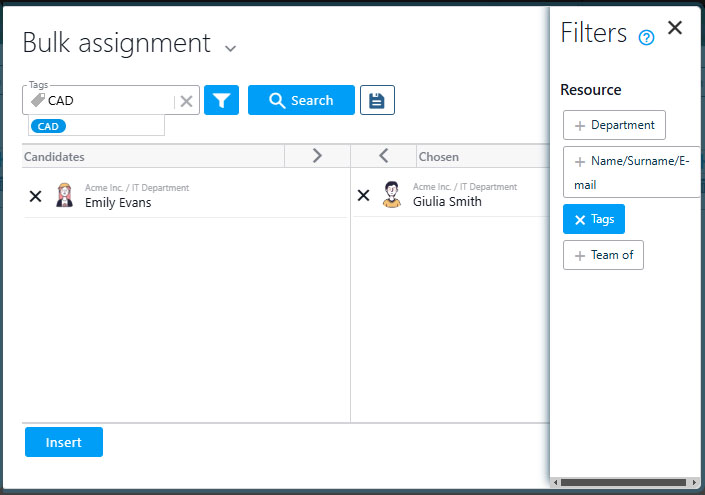
For those who decide which projects to start, the key question is another one: do we have the skills available to do it, within the required timeframe? Twproject lets you use skills as resources when planning future projects.
Here’s how: you create a resource without login that represents a skill (for example “Senior code review”, “Security” or “LLM development”) and assign it, as daily capacity, the group’s potential output: three experts available five hours a day are worth fifteen hours of that skill. By assigning the skill to upcoming projects, the workload view shows how much capacity is already “booked” and where the next bottleneck will form. When the project starts, you take a snapshot of the plan and assign the real people.
Two tools complete the picture:
- assignment priority, which can be set from the project editor and applies from that moment on; each person sees it in their own dashboard and knows what to focus on without alignment meetings;
- department assignment, handy for large agile teams: all members log time on a single assignment, while the worklog analysis still shows the breakdown by person.
Resources are one piece of a bigger picture
Accurate resource management feeds every other process in an IT company, all of which live on the same platform in Twproject:
- project cost control: logged hours and resource hourly rates immediately tell you whether the time freed up by AI is turning into margin or being lost;
- ticket and internal request management, with ToDos and Kanban that are included in the workload calculation instead of staying out of it;
- planning of hybrid projects, waterfall and agile, on the interactive Gantt with dependencies and critical path;
- portfolio view, to decide which projects to start based on the team’s actual capacity.
With release 7.3.001, Twproject also connects to AI assistants via an MCP (Model Context Protocol) server. An IT manager can ask in natural language, for example, how many hours the team has logged on a project this week or which high-priority ToDos are still open, and get an answer based on the real data from projects, worklogs and assignments. The assistant accesses the platform with the user’s credentials, and editing data is enabled by the administrator on a user-by-user basis.
A real case: a healthcare software company
An IT company with 160 employees, developing management software for healthcare and social care facilities, had a 25-person IT department split into small teams, each with its own tools. The goal was to balance the workload taking everything into account: project activities, customer support, spot interventions.
With Twproject it unified its departments on a single platform, integrated via API with the company CRM, and started reading people’s workload across projects. The infrastructure manager explains it like this:
“One of the most effective features for me is the ability to monitor and plan resource occupation independently of any single project.”

Thanks to accurate time reporting, the company now knows how much time support takes up for each product area and can establish at the start of the year how many hours are really available for new projects.
Want to know where the time AI saves your team actually goes?
The answer is already in your team’s data, but you need a tool set up the right way to read it.
Book a demo with a dedicated tutor, an expert in IT project management. You won’t get a generic presentation: we’ll work on your case and show you, step by step, how to configure assignment types, skills and the workload view in Twproject on your real team, until you can see who’s overloaded, who has spare capacity and where the next bottleneck is forming.
👉 Book your free demo with an IT industry expert tutor now
Prefer to start on your own? Try Twproject free for 15 days, no credit card required.