
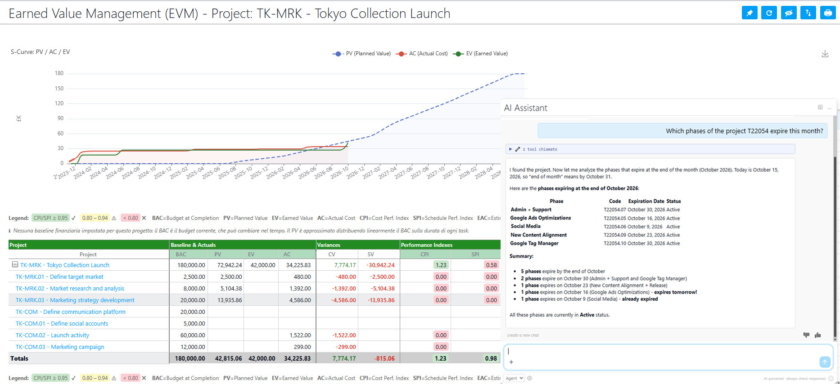
Do you remember the little teaser we ended our article on release 7.2 with? We promised you that the artificial intelligence in Twproject would soon go beyond the support chatbot, going on to interact with your project data. With release 7.3.001, that promise becomes a reality.
But that’s not the only major new feature. This release also brings Earned Value Management to Twproject, the most widely used project control technique for understanding, based on hard figures, whether you’re spending your budget in the right way and at the right time.
Two very different new features, but with a common goal: to provide you with faster and more reliable information on the actual status of your projects. Let’s take a closer look.
TABLE OF CONTENTS
- Twproject connects to AI assistants via the MCP server
- What you can ask the AI about your projects
- Security and control: the administrator always has the final say
- Earned Value Management: keeping the budget under control with the S-curve
- The project’s financial baseline
- The new EVM report with the S-curve
- Other new features in release 7.3.001
- Try the new Twproject now!
Twproject connects to AI assistants via the MCP server
From today, Twproject can be connected to artificial intelligence assistants via the Model Context Protocol (MCP), the open standard that enables AI models to communicate securely with external applications and data sources.
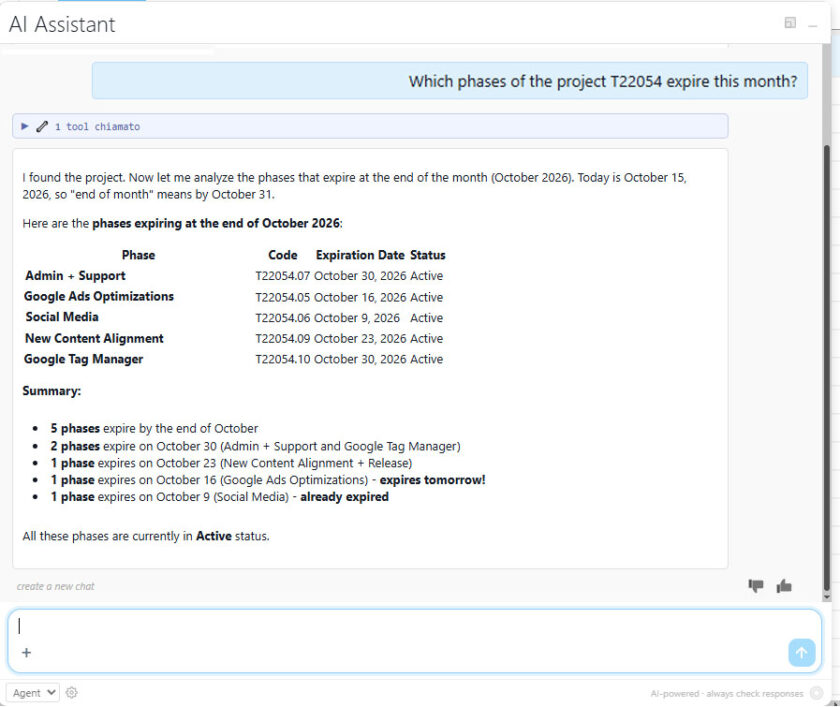
In other words, the AI assistant you use every day is no longer limited to giving generic responses, but can read and, if authorised, update the actual data from your projects in Twproject. You ask a question in natural language, the AI retrieves the information from the platform and gives you a concrete answer, based on the team’s actual work.
This is the next step on from the AI support assistant introduced in version 7.2: initially, the AI explained how to use Twproject; now it helps you work with Twproject.
What you can ask the AI about your projects
The MCP server of Twproject provides the AI assistant with a range of tools covering the main areas of the platform:
- Projects, phases and tasks, including their structure and status
- To-dos, including comments and attachments
- Worklog, i.e. the hours worked recorded by the team
- Resource allocations to projects
- Calendar events
This opens up a completely new way of querying data. Here are some examples of queries you might make:
- “Which high-priority ToDo’s are still open on the Alpha project?”
- ‘How many hours has the team logged on the Beta project this week?’
- ‘Summarize the comments from the past month on the ToDo’s assigned to me.’
- ‘Create a ToDo for reviewing the specification document and assign it to Mark.’
No more filters to set or reports to export to get a quick answer: you just ask the question in your own words, and the data arrives in seconds. Whether you’re a project manager who needs to prepare a status update, or a coordinator who wants to quickly understand where the heaviest workload lies, the time you save is huge.
Security and control: the administrator always has the final say
Connecting an AI to business data requires the right safeguards, and we have made no compromises on this.
- OAuth authentication: the assistant accesses Twproject using the user’s credentials, via a standard and secure authorisation protocol.
- Write access enabled on a per-user basis: write operations (creating or modifying data) are enabled by the administrator, on a user-by-user basis. Users without this permission can only view data.
- Rate limiting: write operations are subject to frequency limits to prevent unintended bulk changes.
In this way, the AI becomes an ally for the team, without ever bypassing the rules and permissions you have already defined in Twproject.
Earned Value Management: keeping the budget under control with the S-curve
The second major new feature in this release is designed for those who need to keep costs and progress under control: Twproject introduces Earned Value Management (EVM).
If you’ve already read our in-depth article on the Cost Performance Index, you’ll know how important it is not to stop at simply comparing actual expenditure with the budget. Simply knowing that you have used up 50 per cent of the budget means nothing on its own: it depends on how much work you have actually completed and how much you should have completed by that date.
The EVM answers precisely this question, by comparing three project metrics:
- Planned Value (PV), the planned value: how much you should have spent, according to the plan, on the work scheduled up to today.
- Earned Value (EV), the earned value: the value of the work actually completed.
- Actual Cost (AC), the actual cost: how much you have actually spent to complete that work.
By comparing these three values, you can immediately see whether the project is behind or ahead of schedule and whether you are spending more or less than expected.
In other words, you can derive indicators such as the Cost Performance Index and the Schedule Performance Index.
The project’s financial baseline
To measure variances, you need a point of reference. In Twproject , you can assign a financial baseline to each project – in other words, a ‘snapshot’ of the cost plan against which to compare the actual progress.
The baseline is also available via the API, so you can integrate it into your reporting or business intelligence tools.
The new EVM report with S-curve
The main output of this feature is the new EVM report, which compares planned value, earned value and actual cost against the baseline, representing them using the classic S-curve.
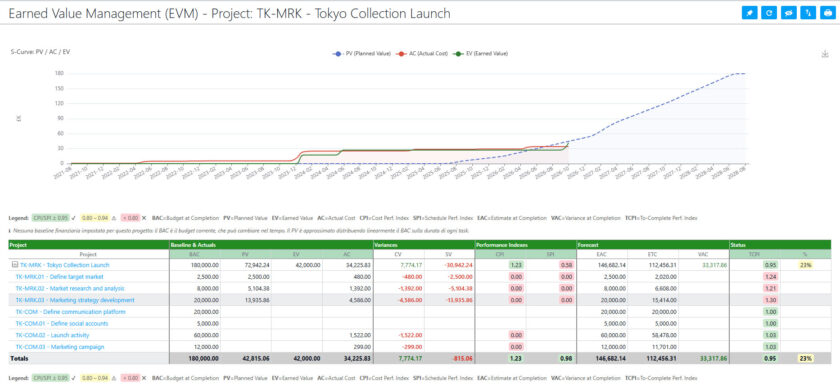
The S-curve shows the cumulative trend of the three values over time and makes any deviations visible at a glance:
- if the actual cost curve is above that of the earned value, you are spending more than the work carried out is ‘worth’;
- if the earned value curve is below the planned value curve, the project is falling behind schedule.
It is a valuable tool for the project manager, but also for the management control and senior management, who can identify projects at risk before the variance becomes difficult to recover from.
Other new features in release 7.3.001
The AI integration with MCP and Earned Value Management are the main new features, but this release brings many others with it. Here are a few in brief.
- Safer concurrent editing: when a colleague is editing a ToDo, it is locked in real time in lists, Kanban boards, planners and the agenda, with a clear message. The Gantt chart also handles simultaneous moves and edits and alerts you if someone else is already working on the same project.
- Worklog from the work plan: a new job, disabled by default, automatically generates worklogs based on the hours scheduled in the work plans, whilst adhering to budget constraints.
- More comprehensive project cloning: recurring ToDo’s are cloned along with the project and their scheduling adapts to the new dates.
- Markdown files in documents: Markdown files within documents and attachments are now displayed directly in the viewer.
- More powerful APIs: sorting by multiple fields, ToDo history, and file uploads for costs, expenses and revenue.
- Enhanced security: improved management of logins, sessions and password recovery, with more robust security settings enabled by default.
In addition to these, there are numerous improvements to Gantt charts, Kanban boards, timesheets and calendars, as well as a significant set of fixes regarding workload calculations.
Try the new Twproject now!
As always, this release is free for all Twproject users. Cloud users will receive the update in the coming weeks.
If you’d like to explore all the technical details of this and previous releases, visit the changelog page.
And if you’re not yet familiar with Twproject and would like to find out how it can simplify the management of your projects and your team, start a free trial today, with assistance from our support team included.