What is a project report and why is it essential? In this article, we’ll try to answer this simple yet by no means trivial question.
When it comes to project management, the focus is often on planning, deadlines and deliverables. Yet there is an equally crucial aspect that is often overlooked until it becomes urgent: reporting.
Reporting on a project means systematically and verifiably documenting everything that has been done, by whom, in what timeframe and at what cost.
This is not bureaucracy for its own sake: it is the tool that enables an organisation to demonstrate – to itself, its customers, its funders or regulatory bodies – that the resources at its disposal have been used correctly and efficiently.
INDICE
The two aspects of project reporting
A comprehensive project report is structured around two main, closely interlinked aspects:
1. Hours worked (time reporting): Who worked on this project? For how many hours? On which specific task? These questions seem simple, but without a precise tracking system, they become extremely difficult to answer retrospectively. Time reporting serves to record the actual effort of every resource involved in the project, phase by phase, activity by activity. Without effective monitoring of working hours, it is impossible to know whether the initial estimates were correct, nor to identify where the work took longer than expected.
2. Costs incurred (financial reporting): Every hour worked has a cost. Similarly, there are costs associated with purchased materials, external services, travel expenses and expense claims. Financial reporting compares all of this against the approved budget, allowing you to monitor in real time whether the project is in line with financial forecasts or whether costs are running over budget.

The most common mistakes to avoid
Many organisations take a piecemeal approach to reporting, relying on Excel spreadsheets, emails, scattered notes or unintegrated software tools. This approach exposes them to real risks:
- Discrepancies between estimates and actual figures: if the initial plan and the actual reporting are stored in separate systems, comparing them becomes a manual task and is prone to errors.
- Data not updated in real time: if hours are entered weeks later, accuracy drops significantly.
- Lack of version history: without a chronological record of changes, it is impossible to trace the project’s progress over time.
- Difficulties with approval and monitoring: when data is stored in different locations, those responsible for validating the reports struggle to get a comprehensive overview.
When the project report is mandatory
For some organisations, project reporting is not just good practice: it is a requirement. Public bodies, companies applying for funding, and organisations involved in co-funded projects (whether EU or national) are often required to produce detailed and verifiable documentation to support the expenses incurred.
In such circumstances, a structured reporting system is not optional: it is an essential requirement to ensure that the funding received is not put at risk.
How do you choose the right reporting tool?
Whether it is a legal requirement or an organisational decision, the end result is the same: we need a system that collects data reliably, organises it in a way that makes it easy to access, and makes it available when it is needed.
This is where project management and reporting software such as Twproject comes into its own.
Let’s take a closer look at which aspects of reporting you can manage easily and effectively thanks to Twproject, a piece of software much loved by project managers.
1. Reporting of hours worked
One of the cornerstones of reporting is the tracking of worklogs, i.e. the recording of the hours actually worked by each team member on each activity or project phase.
With Twproject, you can track the hours worked by task, by project and by team member. You can assign entire departments to a project, thereby creating a single assignment on which everyone can report.
Recorded worklogs are not simply archived: they can subsequently be monitored, analysed and approved by the project manager. The project manager can view the total number of hours recorded for each project by each employee over a specific period, which can be selected using filters.
Each worklog is in a pending approval status, and the project manager can approve it or mark it as invoiced. The data can then be printed or exported, making the entire management of timesheets optimised and centralised.
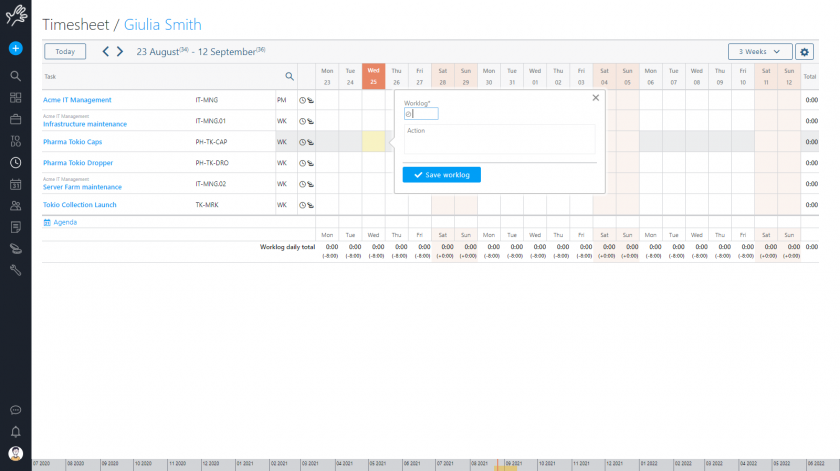
A useful feature for organisations that have to adhere to strict estimates is overrun control: by enabling a specific function, if the allocated hours are exceeded, it will no longer be possible to enter additional hours. An error message will appear, showing the remaining number of hours that can be entered.
2. Reporting on project costs and budget
Financial management in Twproject is deeply integrated into the very structure of the project. There is no need to export data to Excel spreadsheets or use a separate accounting system.
For each resource, the following information is available: estimated hours, hours worked, hourly rate, equivalent amounts, personal budget and total expenses incurred. The estimated total cost and actual cost for each resource are always visible, with any cost overruns highlighted in red. If the project is divided into phases, the bottom row will show estimates and costs for the entire project tree.
What cost categories does the system support? Twproject distinguishes between costs relating to resources and those linked to the tangible assets or services required to carry out the project. For resources, the system takes into account both the cost of the work carried out and any additional expenses incurred by the resource, i.e. everything included in the expense reports.
A feature that is particularly valued in organisations with large teams is the ability to define hourly rates centrally: the hourly rate and cost centre can be defined at resource, department or company level, and the value will be inherited unless otherwise specified. The resource’s rate is entered only once and will be the same across all projects in which the resource is involved.

Budget monitoring by phase
One important point to bear in mind is that Twproject allows for highly granular budget management. You can set and monitor budgets for each project phase, ensuring that costs remain in line with forecasts and preventing any cost overruns.
The BUDGET_OVERFLOW_FORBIDDEN feature, which can be enabled via the advanced features, prevents the entry of costs that exceed the allocated budget, ensuring that each sub-phase of the project adheres to the budget of the parent phase. Similarly, the underflow check prevents the budget from falling below costs that have already been estimated or incurred.
This mechanism is particularly useful for project managers who need to delegate financial management to various levels of the organisation, whilst retaining overall control.
3. Dashboards and reporting
How do you view and share reporting data? With Twproject, you have more than one option.
All recorded data is consolidated into a single view via the project cost dashboard. Here, Twproject allows you to view historical actual costs (worklogs) and up-to-date estimates, providing a clear and up-to-date overview of the project’s actual and estimated costs.
Historical tracking is also guaranteed: all changes to costs, budgets, hours logged and expense claims are recorded daily in the project statistics, so you can always check the status on any given date.
In addition, for those who need to share data with external systems, there is also an Excel export option.
Conclusion: one tool for all
What is the advantage of using Twproject for project reporting? We can summarise it as follows: compared to using multiple applications, Twproject offers a unified tool for cost management, which greatly simplifies the process of recording and transferring financial data, avoiding the complexity of the aggregation work that arises from using different systems.
Feedback from users confirms this: Twproject has made it possible to reduce the number of management tools from as many as 7 to just 1, increasing transparency across global projects and improving control over business costs.
With Twproject, we have improved our reporting and cost control, reducing errors caused by using multiple tools and automating processes

Using Twproject to report on a project means you always have a clear overview of both hours worked and costs, with a system that guides and standardises processes to ensure consistency between estimates and actual figures.
For businesses and public bodies that need to account for the use of resources in a precise and documented manner, this tool reduces the risk of errors, eliminates data loss and makes reporting a structured and verifiable process.
That is why Twproject is regarded by so many companies as the best tool for monitoring and managing project costs.
If you’d like to find out more about how it works, why not try a 14-day free trial with no obligation, during which you’ll also have access to support from a dedicated tutor?