

One of the main challenges of working as a department head is distributing work in a balanced way. With Twproject, you can create tasks, checklists, and recurring activities, assign them to specific team members with priorities and deadlines, and always keep track of who is doing what.
As a result, every sales representative or operator knows exactly what they need to do, by when, and how urgent it is, without needing to check with you every morning. This reduces overlaps, oversights, and the confusion typical of busy operational departments.
Twproject also visually displays each person’s workload so you can balance tasks when someone is under pressure and someone else has some breathing room.
CONTENT
- Where to start: create your department in Twproject
- How to organize team activities
- Monitor work in real time
- Managing priorities, urgencies and communication
- Coordinate multiple sales locations or operational sites
- Twproject in large-scale retail and retail stores
- Twproject valorizza le tue competenze
- Perché Twproject può aiutare anche chi non è un PM
Where to start: create your department in Twproject
Every day, in your department, dozens of things happen simultaneously. You need to know who’s doing what, what’s behind schedule, and where things got stuck. If you work in retail or manage stores, you know this well: management effectiveness isn’t measured by meetings, but by concrete results.
The issue with traditional tools (Excel spreadsheets, WhatsApp messages, and emails) is that they provide a fragmented snapshot. You know what you’ve written, but you don’t always know what’s happening on the other end.
Twproject offers you a unique, up-to-date view of everything happening in your department without requiring you to become a software expert.
The first step is to create a project that reflects your department. You don’t need anything too complicated: just a name, a general goal, and the week’s main tasks.
Here’s how you can get started right away:
•Create a project with your department’s name
•Add recurring tasks: resupply, expiration date checks, training, overtime shifts
•Assign each task to a team member with a due date
•Invite your team: each member will only see the tasks relevant to them
In just a few minutes, you’ll have a functional notice board that replaces dozens of messages and sticky notes.
How to organize team activities
One of the main challenges of working as a department head is distributing work in a balanced way. With Twproject, you can create tasks, checklists, and recurring activities, assign them to specific team members with priorities and deadlines, and always keep track of who is doing what.
As a result, every sales representative or operator knows exactly what they need to do, by when, and how urgent it is, without needing to check with you every morning. This reduces overlaps, oversights, and the confusion typical of busy operational departments.
Twproject also visually displays each person’s workload so you can balance tasks when someone is under pressure and someone else has some breathing room.
Monitor work in real time
One of the most common problems in operational departments is a lack of visibility.
Without a shared tool, managers risk not knowing:
- which tasks have been completed;
- which are behind schedule;
- where bottlenecks are occurring.
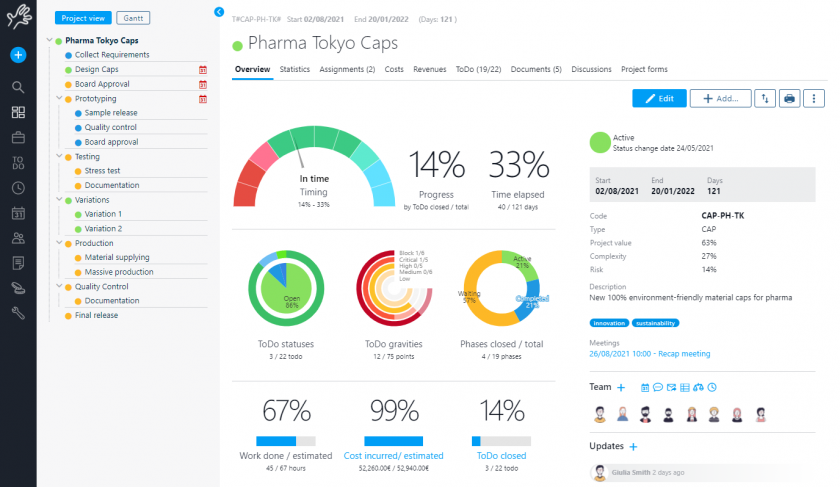
Twproject, on the other hand, makes it easy to monitor the status of tasks.
This allows you to:
- take swift action;
- rebalance the workload;
- identify critical issues;
- improve planning.
This changes the way you carry out your duties. Instead of chasing updates, you take action only when it’s truly necessary—when there’s a real bottleneck or a delay that risks becoming a problem. Your problem-solving becomes swifter and more effective because it’s based on current data, not on perceptions.
The team also works with greater clarity, because everyone has access to the same information.
Managing priorities, urgencies and communication
In any department, urgent matters are never in short supply. The problem arises when everything becomes urgent and your team doesn’t know where to begin. Twproject helps keep things organized: every task is assigned a priority, and when something changes, you can update it in a matter of seconds.
Communication improves as well. Comments and notes are directly linked to the task they refer to, so information doesn’t get lost in chats and emails. If a staff member has a question about a procedure, they write it on the task, and the answer stays there, accessible to everyone. For those managing multiple people or multiple locations, having a single point of reference makes a huge difference.
Coordinate multiple sales locations or operational sites
When a company operates multiple locations or retail outlets, coordination gets even more complex. Management must oversee staff, operations, communications, and results while maintaining a clear picture of what’s happening across different departments.
With no centralized tool, keeping track of information can be difficult. Twproject, on the other hand, provides a consolidated view of the work being done at different locations, making it easier to monitor activities and foster collaboration between teams.
This is especially useful in large-scale retail, where operational needs can change rapidly from one day to the next.
For example, you can easily create a dedicated project for each retail location and manage everything from a single dashboard.
Twproject in large-scale retail and retail stores
If you work in the retail industry, you know that responsibilities can vary significantly from one day to the next. Last-minute promotions, sudden absences, department reorganizations: retail professionals know how much the role of a department manager demands flexibility and quick decision-making.
Twproject is designed to fit this pace. You can adjust priorities and assignments in real time, directly from a tablet or smartphone. If you manage multiple stores, you can create a project for each one and get a single, comprehensive overview of everything.
This is especially useful when you need to train a new sales associate: you create an onboarding plan as a sequence of tasks, assign it to the training manager, and monitor progress without having to ask for daily updates.
Twproject brings your skills to the spotlight
As a reliable department manager, you bring experience, judgment, and interpersonal skills that no tool can replace. Twproject doesn’t change that – it supports it.
The skills you already have become more effective with a structured tool:
•Your management skills gain a system to make them tangible and measurable
•Your problem-solving is faster because you always have up-to-date data at your fingertips
•Your understanding of your department becomes useful data for management
•Your experience with sales staff becomes a trackable development plan
In job postings for leadership roles, familiarity with work management tools are increasingly in demand. Using Twproject in your daily work is a practical way to build this skill without disrupting your workflow.
Why Twproject can help even those who aren’t project managers
Being a great department head already requires many typical project management tasks: organizing work, coordinating people, managing deadlines, and monitoring results.
Twproject doesn’t replace a manager’s relationship skills or experience, but it helps make them more effective through clearer and more structured work management.
Even without specific training in project management, using a shared tool helps reduce errors and disorganization, improves coordination, and provides greater control over daily activities.
Today, the role of a department manager increasingly requires strong organizational skills, quick decision-making, and coordination abilities. The right tools can make all the difference in the day-to-day management of your team and department.

