
In an engineering firm, the quality of decisions depends largely on the quality of the information on which they are based: an incomplete, delayed or manually compiled report almost always arrives too late to be of any real use, and those who have to decide whether to slow down a phase, reallocate a resource or take action on a cost that is running over budget often find themselves having to do so on the basis of incomplete data.
CONTENTS
- The most common difficulties in producing project reports
- What is really needed to build an effective reporting system
- 1. Data updated in real time, not reconstructed manually
- 2. Reports tailored to those who need to read them
- 3. A historical record to learn from, not just a snapshot of the present
- Examples of key reports for an engineering team
- A process linked to planning and costs
- The Repower AG case study
- Let us show you how to build your first report
The topic we are addressing here, therefore, is not how to produce just any report, but how to equip yourself with systems and methods that generate real-time data, which can be shared with the technical team and are also readable by those – such as a manager or a buyer – who need to assess the progress of projects without delving into the operational details of each phase.

The most common difficulties in producing project reports
Before looking at the solution, it is useful to recognise where the inefficiency stems from. Those who manage engineering teams typically face these obstacles:
- reports are compiled manually by cross-referencing data taken from various tools, and are therefore only updated occasionally;
- information on costs, progress and resource utilisation is stored in separate files, and collating it takes time away from operational work;
- by the time the report is ready, the situation it describes has already changed, and the decision it was meant to support arrives too late;
- the same report, designed for the technical team, often ends up with management without being adapted to the level of detail that decision-makers actually need;
- there is no structured historical record of past projects, so every new planning exercise starts from scratch instead of learning from data already collected.
What is really needed to build an effective reporting system
Best practice in the use of reporting tools in the engineering sector is based on three pillars:

1. Data updated in real time, not reconstructed manually
Manually reconstructing the progress status every time a report is needed is time-consuming and inevitably leads to errors or approximations.
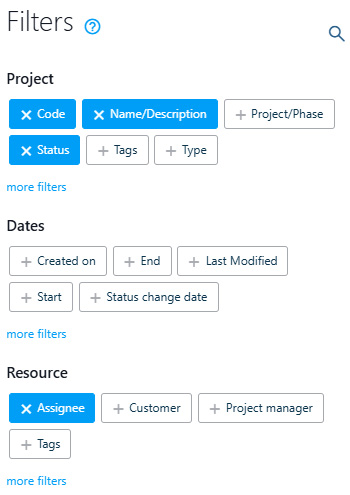
A statistical dashboard that updates automatically as work progresses, such as the one available for each project and for the entire portfolio in Twproject, eliminates the need for manual reconstruction; charts and indicators reflect progress in real time, and the data can be filtered by project, phase, resource or period and exported in various formats, including Excel, so they can also be shared outside the platform.
2. Reports tailored to those who need to read them
A technical report designed for the project team is rarely the right format to present to those who decide on budgets and priorities; adapting it manually each time is a constant waste of time.
With an advanced reporting engine such as Jasper Reports, integrated into Twproject, it is possible to create – just once, using a graphical editor and without writing complex queries – the most suitable report template for each stakeholder, covering costs, resources or progress, and reuse it whenever an update is required.
3. A historical record to learn from, not just a snapshot of the present
Without a structured archive of project data, every new plan is based on estimates that have to be redone from scratch, losing the value of the experience gained from previous projects.
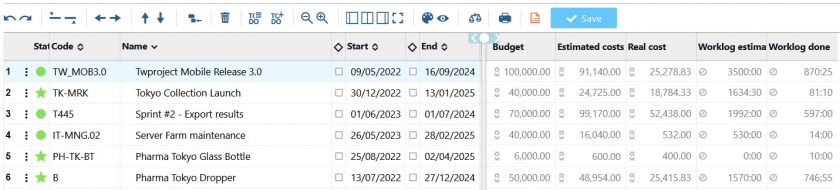
In terms of portfolio, the dashboard allows you to link the relevant financial report to each project, comparing the estimated budget with actual costs over time; a useful overview for understanding which projects have been most profitable, where margins have been lost, and how to calibrate estimates for future projects.
Examples of key reports for an engineering team
- Phase milestone reports: these provide a snapshot of progress against key project milestones: concept, detailed design, testing, handover. This report helps to understand, phase by phase, whether the delay of a milestone (for example, a postponed acceptance test) will have a real impact on the final handover date or whether there is still scope to make up for lost time in subsequent phases.
- Project status report: shows the overall progress, milestones achieved and critical areas. For an engineering team, this is the report to take to meetings with the client or technical management; it allows you to see at a glance whether a detailed design phase is on schedule or whether a delay in testing risks postponing the final handover.
- Resource workload report: analyses the distribution of tasks amongst team members to avoid overloads. This is particularly useful when several projects share the same pool of specialist engineers (for example, the limited number of structural engineers or CAD specialists); it allows you to assess, before accepting a new project, whether the team actually has the capacity to handle it, rather than finding out halfway through the project.
- Timesheets and activity sheets: these summarise the hours worked by employees on individual tasks. In engineering, these form the basis for comparing the hours estimated at the tender stage with those actually recorded for each phase (analysis, design, verification, testing); this data is invaluable not only for invoicing the client correctly, but also for better tailoring future tenders.
- Reports on expenses and costs: these monitor the progress of the budget to prevent cost overruns. For engineering projects, where the costs of materials, subcontractors and specialist hours are a major factor, this report allows you to identify a cost overrun whilst it is still recoverable, rather than discovering it only after the project has been completed.
A process linked to planning and costs
Reporting, however, does not stand alone. A useful report stems from an [link] up-to-date Gantt chart, a resource allocation that has been correctly tracked, and cost management that distinguishes between staff and external costs.
All these are processes which, in an engineering firm, must be aligned within a single tool; otherwise, the final report risks presenting a picture of a situation that has already been overtaken by events.
It is precisely the integration between planning, workload and costs that makes reporting data reliable, rather than merely aesthetically organised.
The Repower AG case study
Repower AG, an energy group operating in Switzerland, Italy and Germany, needed to centralise its IT department’s project information within a single tool, moving away from manual management based on Excel spreadsheets and other piecemeal tools. The Head of Finance & PMO explains:
The transition to Twproject has enabled us to centralise and gain a clear overview of the progress of our activities. Over time, we have refined a very specific process, which in most cases involves a weekly meeting with the PMs to review progress.

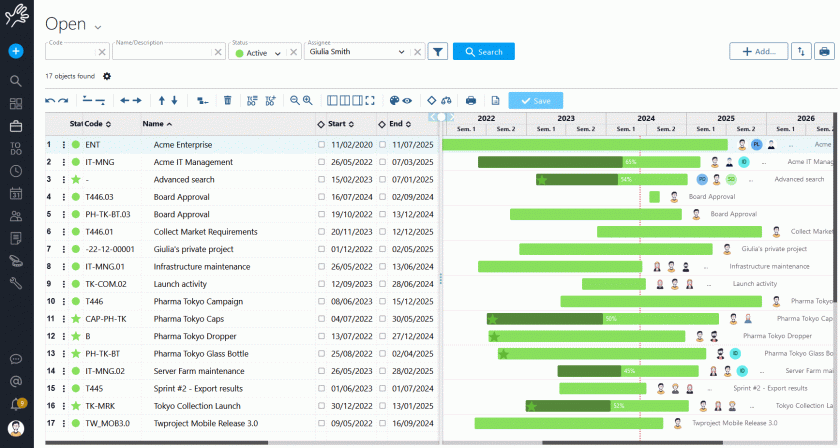
The Gantt chart from Twproject, updated in real time, enabled the team to accurately identify completed, ongoing and overdue tasks, making the weekly reporting meeting a quick review rather than a lengthy manual reconstruction of data.
Let us show you how to build your first report
Setting up a reporting system properly requires understanding which data really matters to your team and to decision-makers. That’s why Twproject provides a dedicated tutor, an expert in the engineering sector, who guides you step by step in creating the reports most useful for your specific situation, based on your actual projects.