Hourly reporting is one of the key tasks in project management, both in the business world and in public sectors such as educational institutions.
Creating a clear, accurate, and easy-to-read report allows you to keep costs under control, stay within budget, and prove that human resources are being allocated correctly.
In this article, we’ll take a look at how to set up an effective reporting system and which tools to use to simplify the entire process.
CONTENT
What is hour reporting and why is it important?
Hourly reporting involves logging, aggregating, and presenting the hours worked by each team member on one or more projects. It’s not just a matter of noting start and end times: the goal is to link each hour worked to a specific project activity, phase, or deliverable.
A robust hourly report allows you to:
- check the actual progress of the project compared to what was planned;
- calculate the actual cost of the resources used;
- identify bottlenecks or tasks that take longer than expected;
- provide documentation to clients, lenders, or regulatory bodies.
In many industries, from consulting to public administration, from European projects to schools, hourly reporting is a legal obligation. Those who work on grant-funded projects, for example, know full well how critical it is to produce accurate and verifiable documentation.
How to structure a time sheet report
A successful report is structured logically and consistently. Here are the essential elements.
1. Heading and date range
The report must clearly state the reference project, the time period (week, month, phase), the name of the contributor or team, and the person responsible for validation.
2. Timetable by activity
The centrepiece of the document is a spreadsheet that connects each workday to the tasks performed. Each row should include: date, resource name, task, hours worked, and relevant notes. This structure makes the document accessible to those who did not work directly on the project.
3. Summary by phase or work package
Along with daily details, it is helpful to include an aggregated summary by phase or work package. This helps you quickly compare the estimated hours with the actual hours worked.
4. Signature and validation
The report must be signed by the employee and countersigned by the project manager. In some cases, such as reports for public tenders, the signature of the organization’s legal representative is also required.
Twproject: a concrete example of management and reporting
Twproject natively integrates advanced reporting features. Let’s take a look at some practical examples of how they’re used.
– Weekly timesheet: Each team member can access their personal dashboard and fill out the weekly timesheet directly in their browser. Hours are automatically assigned to the correct project and task. The manager receives a notification and can approve or request corrections with a single click.
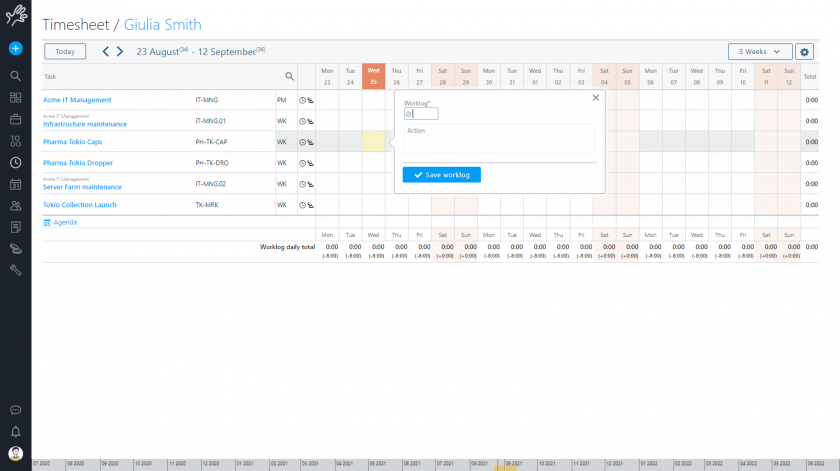
– Reports for clients or funders: The project manager can generate an aggregated report by project in seconds, filtering by resource, period, or phase. The document is then exported to be sent to the client or attached to a formal report.
– Hourly budget control: with Twproject you can set an hourly budget for each task or phase. As your employees log their hours, the system updates the progress indicator in real time. This allows the team to intervene before the budget is exceeded, improve performance over time, and optimize future planning.
– Reporting on multiple projects. An employee working simultaneously on multiple projects can allocate their hours across different activities on the same day. Twproject handles this complexity flawlessly, producing separate reports for each project or a consolidated overview.
3 common mistakes in hourly reporting and how to avoid them
Even with high-quality tools, recurring errors can impact report quality.
1- The first is post-event data entry: many employees tend to log their hours at the end of the week or month, resulting in a loss of detail regarding individual tasks. It is crucial to implement a daily data-entry routine.
2- The second error is either excessive granularity or, on the contrary, vague descriptions. “Meeting” doesn’t say much; “Check-in meeting with Client X to review the communication plan” is much more useful for reporting purposes.
3- The third issue is the lack of validation. An unsigned and unapproved report has no legal or contractual value. The approval process must be integrated into the workflow, not left to personal initiative.
Hourly reporting on a project is not a paperwork chore, but a strategic management tool.
Producing accurate, readable, and validated reports makes it possible to make better decisions, demonstrate the value of the work done, and maintain the trust of clients and funders.
Tools like Twproject streamline this process by automating data collection and report generation, giving the team more time to focus on the work that truly matters.