

As many of you will already know, and as we have previously reported in one of our articles, Microsoft Project Online will be discontinued by September 2026.
The company offers its Planner as an immediate alternative, in a version that is, so to speak, ‘enhanced’ in terms of team management, to bring it partly in line with the features of PMO software.
But as we have already seen, Planner lacks certain features that would truly make it a comprehensive project management platform.
So, in this article, we’ll give you a quick overview of some alternative tools, helping you to choose project management software that’s just as good as the almost defunct Microsoft Project.
CONTENT
Introduction: which companies should be concerned about the closure of Project Online?
Based on our analysis, we have identified certain types of organisations for which migrating to Microsoft Planner following the end of support for Microsoft Project Online does not appear to be the best solution. These include:
- Structured PMOs, because they will need a more advanced system that breaks projects down into phases and sub-phases and distinguishes these from individual daily tasks (or to-dos). Every activity carried out within the projects of structured companies must be well documented and placed on a timeline with deadlines, milestones and dependencies. An interactive and powerful online Gantt chart is required, one that manages the critical path and workloads and supports the project manager throughout all phases of project planning, launch and execution.
- Companies with strict cost controls, because, as we have seen, Planner is not a software solution that links financial planning to project management. This means that staff from different departments will no longer be able to use the same operational tool, but will have to rely on integrations that are not always comprehensive or complete. The project manager may find themselves having to enter the same data into different tools, with the risk of making critical errors.
- Consulting companies and, more generally, all those companies that interact extensively with clients and require tools to facilitate the sharing of data. The native reporting functionality in Planner is lacking and needs to be supplemented with other tools or manual intervention in order to be shared.
- Multi-project organisations that require data drawn from multiple sources. In this case, the key tools that provide a bird’s-eye view – namely the advanced portfolio and the multi-project timesheet – are not available on Microsoft Planner Online, which means that managerial oversight is limited.
The alternatives: where to turn after Project Online closes
All these companies, which manage the real complexity of projects, need a structured platform designed to meet a variety of needs.
There are valid alternatives on the market, namely software designed specifically to support teams and managers in project development.
So why settle for a makeshift solution? Let’s take a look instead at the real alternatives to Microsoft Project in this brief but essential guide.
1. Twproject

Twproject is the project management software which, of all the alternatives to Microsoft Project Online, comes closest to matching the latter’s comprehensiveness and structure — surpassing it, in our view, in terms of flexibility and integration of features.
This platform was designed from the outset for the professional management of complex projects: a hierarchical structure comprising projects, phases and sub-phases; a dynamic Gantt chart with a critical path; cost management at all levels; multi-project timesheets; and advanced portfolio management.
Unlike Microsoft Planner, Twproject is not simply a repurposed task manager: it is a tool designed for project managers and PMOs working on multiple projects simultaneously, with distributed teams and budgets to monitor in real time.
Key features:
- Interactive and dynamic Gantt chart: featuring critical path management, task dependencies, comparison baselines and automatic rescheduling. It updates in real time as assignments change.
- Hierarchical project structure: the ability to break down each project into an unlimited number of phases and sub-phases, each with its own budget, resources and deadlines.
- Integrated cost management: monitoring of direct and indirect costs, resource costs and revenues within the same environment. Comparison of planned versus actual figures at every level of the project.
- Workload management: intelligent algorithm that distributes the workload in an optimised manner, flags overloads and proposes rescheduling solutions.
- Portfolio and multi-project dashboard: an overview of all active projects, with progress indicators, budget status and resource utilisation.
- Multi-project timesheets: team members record hours across multiple projects simultaneously; data is automatically transferred to cost and workload analysis tools.
- Configurable and shareable reports: export to various formats for sharing with stakeholders and clients.
- Project templates: each project or phase can be saved as a template to speed up future planning.
- On-premises or cloud installation: Twproject can be hosted on the company server or used in SaaS mode, ensuring maximum flexibility even for those with stringent security requirements.
Price: from €4.89 per user/month.
Pros: Twproject is the most comprehensive and well-structured solution for anyone looking for a genuine alternative to Microsoft Project Online. It offers all the necessary features within a single platform, is suitable for teams of any size, and scales as your business grows. Despite its wealth of features, it has a relatively short learning curve.
Cons: we see no negative aspects.
The ideal choice for businesses looking for a robust and comprehensive alternative: a tool designed for project managers, offering everything needed to plan, monitor and manage projects in one place.
2. Jira

Jira is one of the world’s best-known project management software packages, particularly popular with software development and IT teams working with agile methodologies. It offers robust tools for task tracking, sprint management, Kanban and Scrum boards, and advanced, customisable reporting.
As an alternative to Microsoft Project Online, Jira handles task management and progress tracking well, but often requires integration with other Atlassian tools (such as Confluence or Jira Product Discovery) to achieve a level of comprehensiveness comparable to that of a dedicated PMO suite.
Key features:
- Scrum and Kanban Boards: native tools for agile teams, featuring backlogs, sprint planning and velocity charts.
- Customisable dashboards: real-time overviews of project status, with widgets that can be configured to suit any requirement.
- Roadmaps and timelines: visualisation of task dependencies and project milestones.
- Advanced reporting: burndown charts, cumulative flow diagrams and progress reports.
- Automations: configurable rules to automate notifications, assignments and status updates.
- Workload monitoring: identification of overloads and the ability to reassign tasks.
- Integrations: native connection with Confluence, GitHub, GitLab, Slack and other apps via the marketplace.
Price: from $7.91 per user/month.
Pros: Jira is a powerful and highly customisable tool, with a vast range of integrations. It is the natural choice for those already working within the Atlassian ecosystem or for development teams that rely on Scrum and sprints.
Cons: the learning curve is steep and the initial setup can be complex, particularly for non-technical users. To use it comprehensively as a replacement for Project Online, it often requires integration with other tools in the Atlassian suite, which leads to increased costs.
A powerful tool, but one that requires experience to use effectively: ideal for IT and development teams, but less straightforward for a generalist PMO looking for a complete replacement for Project.
3. ActiveCollab
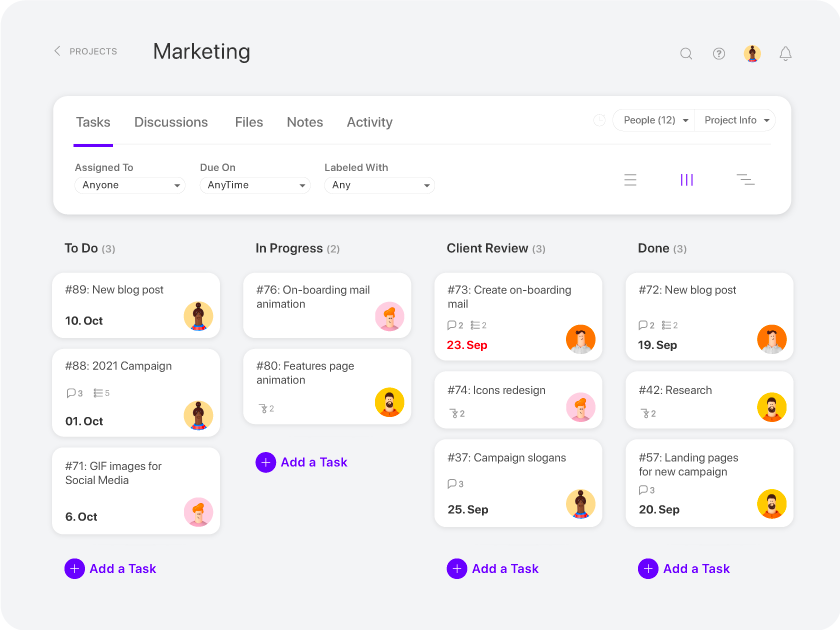
ActiveCollab is a service-oriented project management platform that integrates task management, time tracking, invoicing and collaboration with clients into a single environment. It explicitly describes itself as ‘project-oriented’ and is therefore well-suited to monitoring and managing individual projects.
It offers a viable alternative to Microsoft Project Online for teams that need a comprehensive yet affordable tool with robust cost control features. However, the price tends to rise significantly when more advanced features, such as invoicing and financial management, are added.
Key features:
- Multiple project views: Kanban, Gantt (timeline), list and calendar, at the user’s choice.
- Workload management: capacity planning with daily and weekly views for each team member.
- Integrated time tracking: manual or timer-based recording, with timesheet management at task and project level.
- Comparison of estimated vs. tracked hours: a useful tool for identifying activities at risk of exceeding the budget.
- Budget management: automatic alerts if the set budget is exceeded.
- Quotations and invoicing: with the premium plan, you can generate quotes and invoices directly from the platform.
- Collaboration with clients: client portal for sharing updates and managing approvals.
- Project templates: creation and reuse of templates to speed up the launch of new projects.
Price: from $9.50 for the first 3 users.
Pros: an intuitive and user-friendly interface with a gentle learning curve. Good integration between task management, time tracking and budget control.
Cons: some key features, such as billing and invoicing, are only available on the higher-tier plan or as an additional paid add-on, making the overall cost higher than expected. The ability to manage large-scale projects or those with complex hierarchical structures may be limited.
A comprehensive and well-designed platform, ideal for medium-sized agencies and service teams, but the final cost can rise significantly if you require the full suite of features.
4. Scoro

Scoro is a Professional Services Automation (PSA) platform designed for agencies, consultancy firms, architectural practices and IT companies. It combines project management, resource planning, CRM, invoicing and financial reporting into a single system, with the aim of covering the entire project lifecycle from quotation to invoice.
Unfortunately, budget management does not extend in sufficient detail to the project’s sub-phases, which can be a limitation for PMOs dealing with complex project structures.
As an alternative to Microsoft Project Online, Scoro offers comprehensive and well-integrated functionality, with a particular focus on project profitability and service team management. The platform is constantly evolving, with frequent updates and the recent introduction of subtasks for more granular planning.
Key features:
- Comprehensive project management: planning, task allocation, dependencies, milestones and an interactive Gantt chart to visualise project timelines.
- Quotes and budgets: create quotes that can be converted into projects with a single click, with monitoring of the variance between planned and actual costs.
- Resource planning: real-time heatmaps to view team availability and prevent overloading.
- Time tracking: time recording with integrated timers and automatic timesheet completion.
- Billing and invoicing: automated management of time- and material-based billing, fixed-rate billing and retainer billing.
- Revenue forecasting: revenue forecasting based on the pipeline and work in progress.
- Integrated CRM: management of the sales cycle from quotation to closure, with visibility into projects associated with clients.
- Dashboards and reporting: real-time insights into progress, profitability, resource utilisation and team performance.
Price: from $19.90 per user/month.
Pros: a well-designed all-in-one platform for service companies, offering seamless integration between operational management and financial control. It features an intuitive interface and a responsive support team.
Cons: the Gantt chart is functional but less advanced than dedicated solutions: its design is primarily geared towards resource planning rather than the structured management of project phases. The financial management features have certain limitations.
A robust and well-integrated platform for service companies looking for a comprehensive tool; however, those requiring advanced management of project phases and associated budgets will encounter some limitations.
5. Sunsama
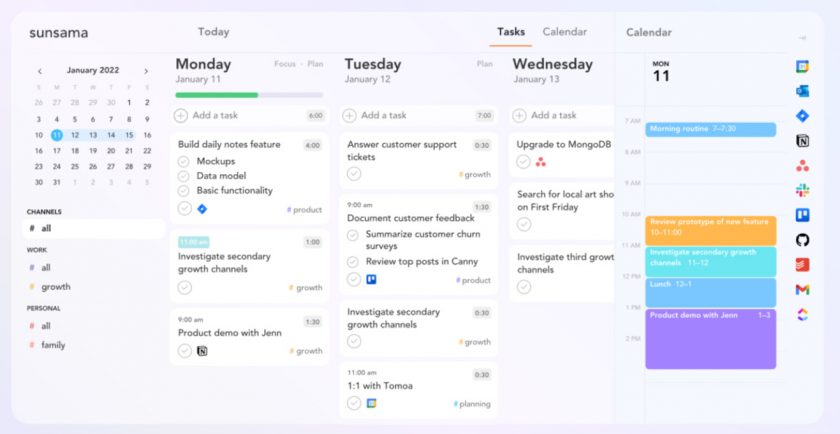
Sunsama is a daily planning and task management app designed for professionals who want to take a mindful and structured approach to organising their work. It stands out for its focus on personalised daily planning, featuring guided morning and evening routines, time-blocking on the calendar, and integration with leading productivity tools.
As an alternative to Microsoft Project Online, Sunsama is intended to be a complementary tool rather than a replacement: it excels at managing day-to-day activities and consolidating tasks from multiple platforms, but does not offer the typical features of a structured PMO software package.
Key features:
- Guided daily planning: a morning routine that helps you set priorities and structure your working day.
- Drag-and-drop time-blocking: the ability to allocate tasks to time blocks in the calendar, with visual alerts if you’re overloaded.
- Calendar integration: two-way synchronisation with Google Calendar and Outlook.
- Task consolidation: import tasks from Asana, Trello, Jira, GitHub, Notion, ClickUp, Todoist, Gmail and Slack into a single view.
- Weekly review: a visual report at the end of the week showing time allocation by project and priority.
- Weekly goals: a tool to define and monitor the week’s main priorities.
- Channels and contexts: organisation of tasks by project (channel) or context (energy, location, etc.).
- Focus mode and Pomodoro timer: to reduce distractions whilst working on individual tasks.
Price: $20 per month (billed monthly) or $192 per year.
Pros: a clean interface and a thoughtful approach to work planning. Ideal for those who already use multiple project management tools and need an extra layer of personal organisation.
Cons: it is not a structured project management software and does not handle complex projects involving phases, Gantt charts or budgets. It only allows you to plan a few weeks in advance, which makes it unsuitable for the long-term planning typically required by a PMO. Each user has an individual profile: there are no proper team features.
A sophisticated tool for those who want to plan their working day more effectively, but anyone looking for a genuine alternative to Microsoft Project Online will need to use it alongside a more comprehensive PMO platform.

6. Vena
Vena is a Financial Planning & Analysis (FP&A) platform that combines the familiarity of Excel with a centralised engine for financial data management, budgeting, forecasting and reporting. It is primarily aimed at finance teams in medium-sized and large companies that need to automate their planning processes without abandoning the logic of spreadsheets.
As an alternative to Microsoft Project Online, Vena handles financial planning and cost control effectively, but does not offer the typical features of project management software (Gantt charts, task management, assignments, workload). It is therefore suitable for companies primarily seeking a replacement for the financial component of Project, to be integrated with other tools.
Key features:
- Excel-native interface: all planning takes place within a centralised Excel environment, with version control and real-time co-authoring.
- Budgeting and forecasting: budget management for departments, projects and cost centres, with what-if scenarios and rolling forecasts.
- Automatic consolidation: data collection from ERP, CRM, HRIS and other business systems into a single source of truth.
- Workflows and approvals: structured processes for the collection, validation and approval of planning data.
- Insights: interactive dashboards, variance analysis and predictive modelling with natural language querying.
- Audit trail: comprehensive tracking of changes to ensure transparency and compliance.
- Integrations: native connectivity with Power BI, Microsoft Dynamics 365, NetSuite and other ERPs.
- Advanced reporting: multidimensional reports with drill-down capabilities to analyse data at any level of detail.
Price: professional plan from $5,000 per year.
Pros: ideal for companies that require strict financial control and already use Excel as a planning tool. The familiar interface makes it easy for finance teams to adopt.
Cons: although the platform’s interface and functionality are based on Excel, they require a significant investment in terms of implementation and training. It is not a project management tool in the traditional sense: features such as Gantt charts, resource management and the tracking of operational activities are completely absent.
A mature and powerful platform for financial management, but it should be seen as a specialised tool for the finance team, not as a complete alternative for Microsoft Project Online.
Conclusion: seize the opportunity for change
The shutdown of Microsoft Project Online in September 2026 represents an opportunity rather than a problem: now is the right time to consider more modern, flexible and comprehensive tools.
As we have seen, there are various options on the market, each catering to different needs. Those managing structured PMOs, multi-phase projects with strict cost control and distributed teams will find that Twproject is the solution that most closely resembles — and in many respects surpasses — Microsoft Project Online.
We have offered a range of options designed to meet the needs of those working in more specialised fields, such as agile software development, advanced financial planning, or the management of agencies and consultancy firms, so that every business can find a solution tailored to its specific requirements.
In any case, our advice is not to settle for a workaround like Planner, but to invest instead in a platform designed from the outset to handle the real complexity of business projects.
If you think Twproject might be the best choice for your business, try it for free here and find out why hundreds of project managers around the world have already chosen it as an alternative to Microsoft Project.


